



🇦🇺 Australia: Print FAQs
Australian Print is a premium add-on feature that expands your monitoring beyond online to content to include Australian Print. Print access is governed by direct licensing agreements made with Nine Entertainment, Copy Right Agency Limited (CAL), News Corp Australia (NCA) and Australian Community Media (ACM)
👉 To learn more about Australian Premium Content check out this article.
This article will cover:
Before You Begin
Print monitoring requires one of the following subscriptions:
- Australian Premium Print Content - National
- Australian Premium Print Content - Regional
- Australian Premium Print Content - CAL
If you're unsure whether Print monitoring is included in your subscription, contact your Meltwater Account Team.
View Print Content in Explore
Use Explore to search, view, and analyze print content.
To view print content:
-
Click Explore in the left-hand navigation menu.
-
Open an existing search or create a new search (learn how to Create a Search.)
-
Click the Source Type filter.
-
Expand the News filter using the arrow
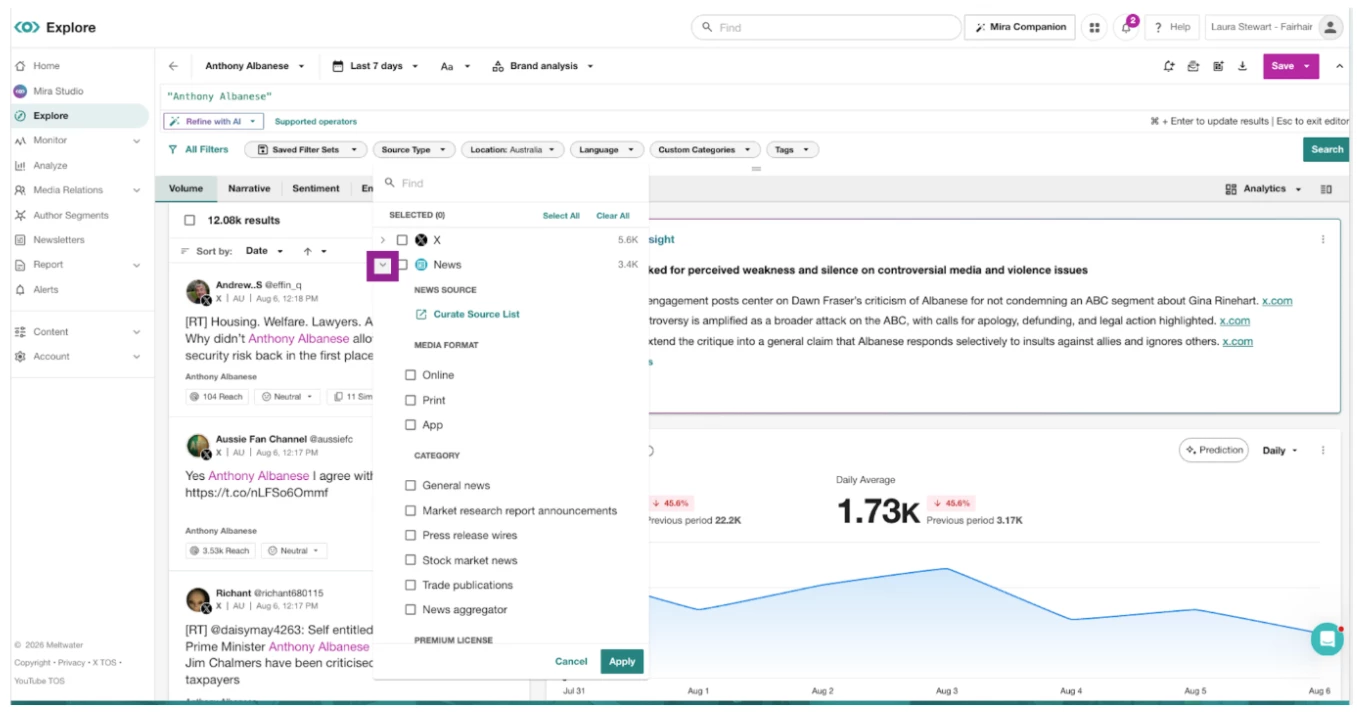
- Select Print
- Click Apply.
- Results will default to the last 7 days. Adjust the date range using the date picker in the upper-right corner.
Filter for Specific Print Sources in Explore
- Click Explore in the left-hand navigation menu.
- Open an existing search or create a new search (learn how to Create a Search.)
- Click the Source Type filter.
- Expand the News filter using the arrow
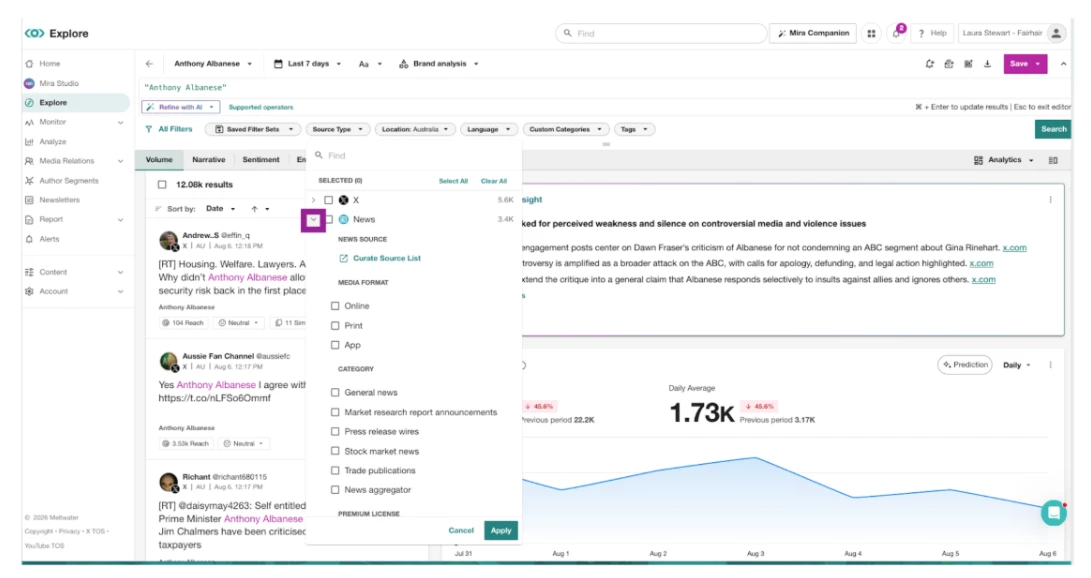
- Select Curate Source List
- In the search bar, search for your preferred publications and select those that are relevant: eg Sydney Morning Herald print
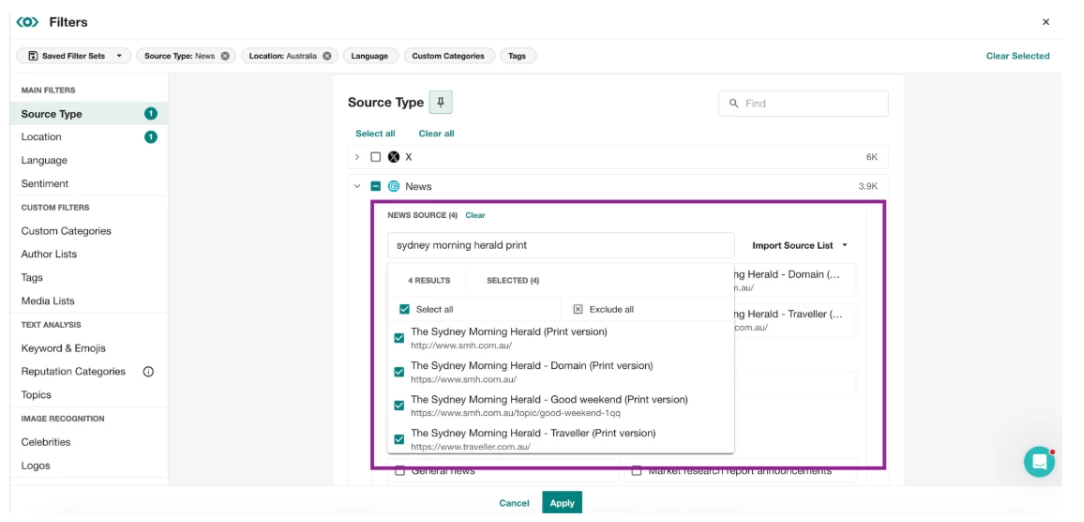
- Once you have added all your preferred publications, select Apply.
- Press the Save drop-down in the top-right corner.
- Click Save
💡 Once you have selected your preferred print publications save the filter set so you can apply this filter to other searches.
- Click Saved Filter Sets
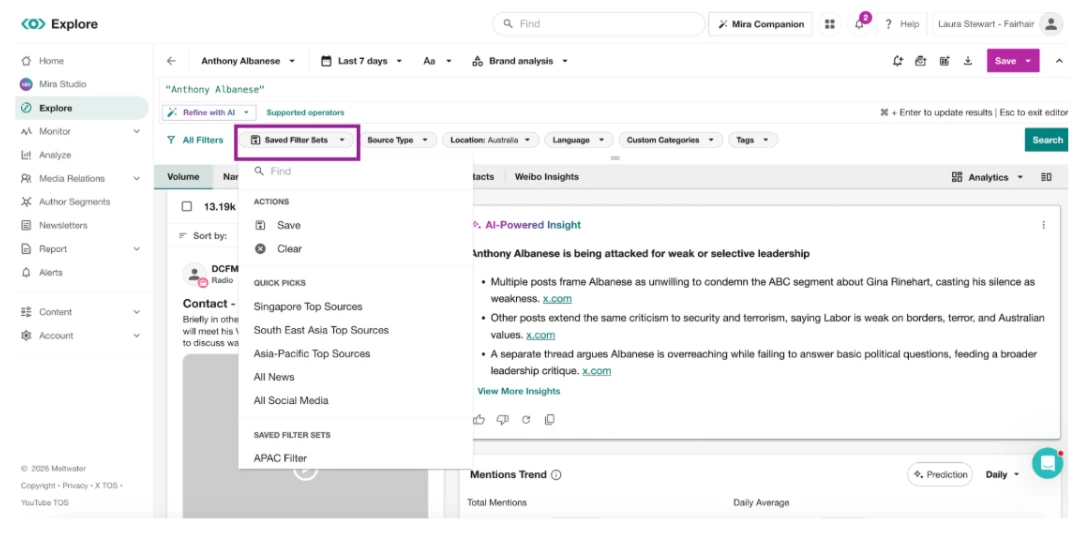
- Select Save
- Name your filter set eg. Australian Print Filter
- Click Save
- To apply the newly saved filter set to you results in this search or other searches
- Select the Saved Filter Sets drop-down
- Click on the filter set. Your search results will automatically update based on the filters applied.
View Front Page Mentions
In Explore
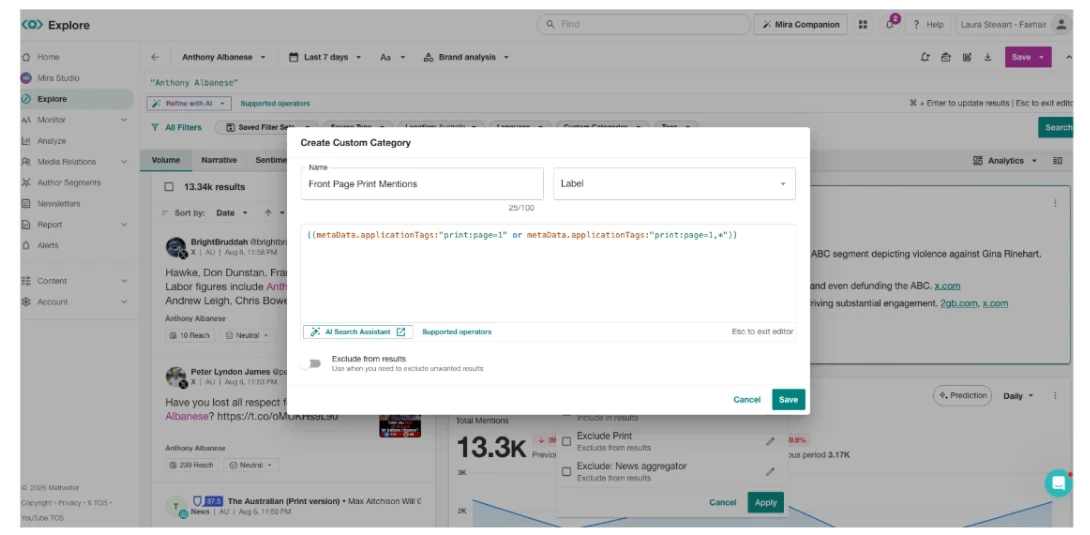
Create a Custom Category to focus on front page mentions
- Click Explore in the left-hand navigation bar
- Open an existing search or create a search (learn how to Create a Search.)
- Click the Custom Categories filter.
- Select Create Custom Category
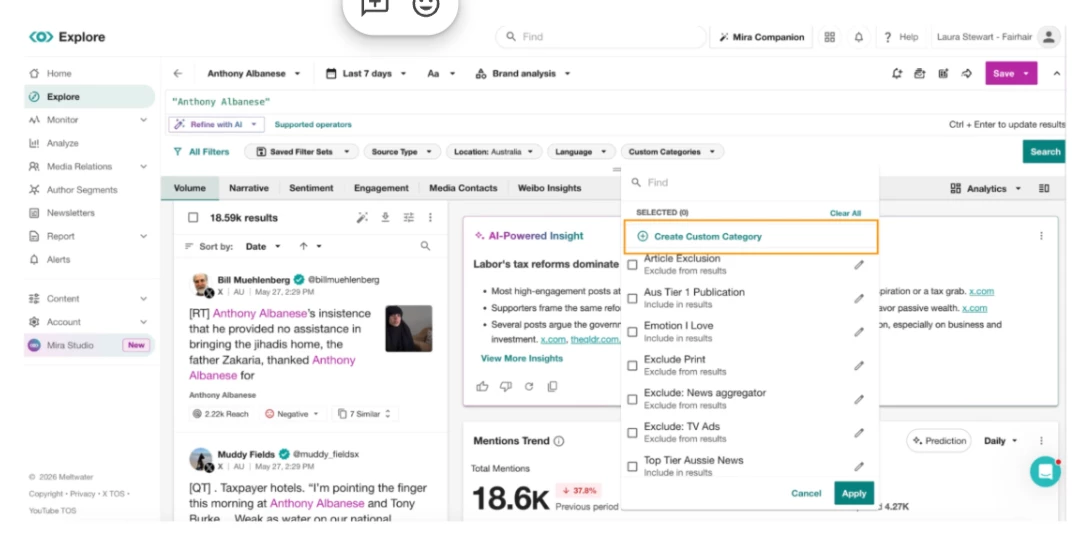
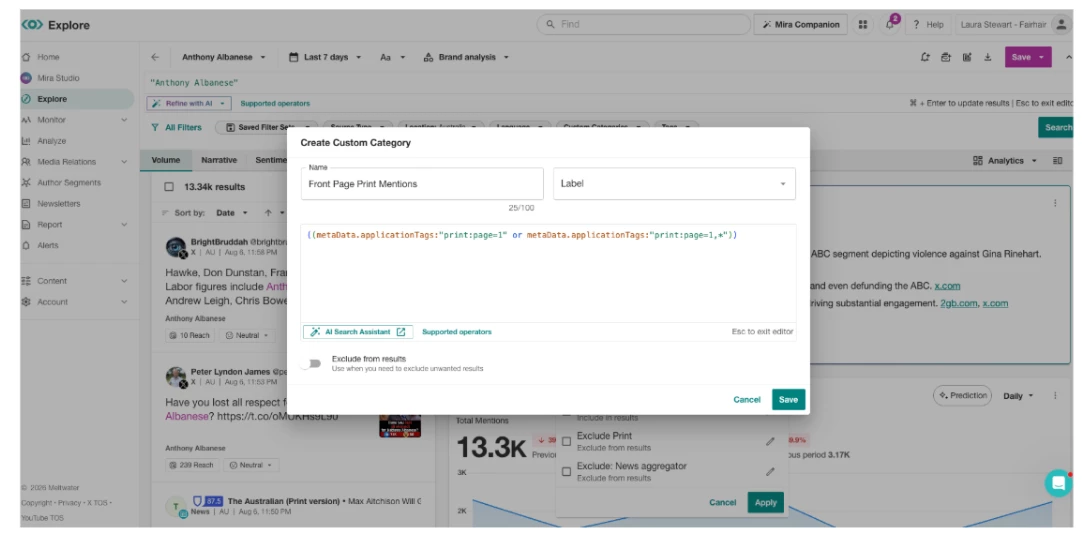
- Enter a category name (for example, Front Page Print Mentions).
- In the Boolean field, enter:
metaData.applicationTags:"print:page=1" or metaData.applicationTags:"print:page=1,*"
-
Click Save.
-
Select the checkbox next to your new category.
-
Click Apply.
In Monitor
Create a stream dedicated to front page mentions
- Click the Monitor drop-down in the left-hand navigation
- Select Views
- Open an existing Monitor View or create a new one
- Click Edit
- Select Show Filters
- Select Custom Categories
- Click Create Custom Category
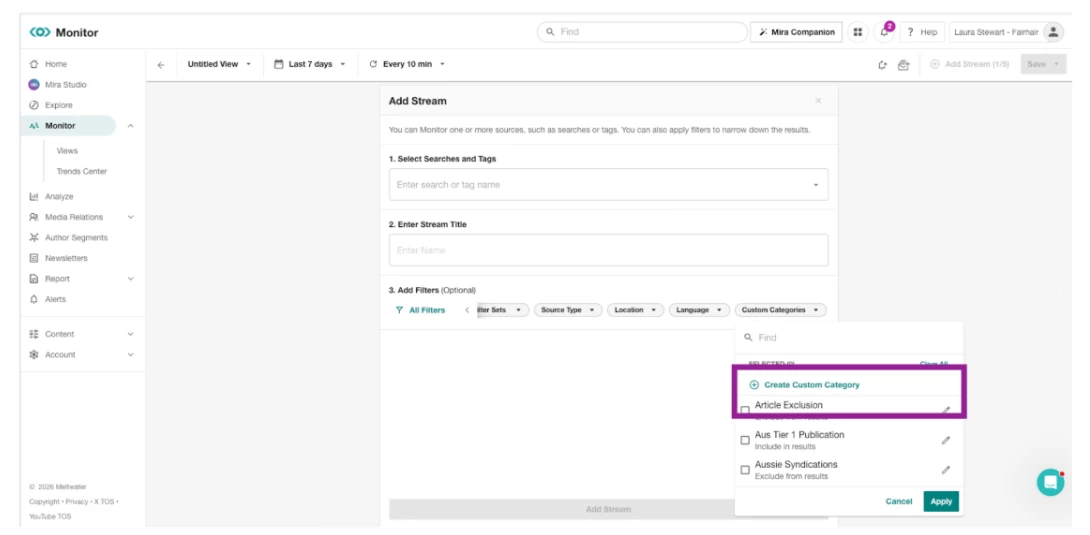
- Enter a category name (for example, Front Page Print Mentions).
- In the Boolean field, enter:
metaData.applicationTags:"print:page=1" or metaData.applicationTags:"print:page=1,*"
- Click Save.
-
Select the checkbox next to your new category.
-
Click Apply.
Monitoring your Print Clicks
Different copyright owners provide varying access to their publications. If you’re viewing print content from particular copyright owners you may have a limited number of views or ‘clicks’ based on your subscription.
Here are the details for the 3 main copyright owners covered by Meltwater:
- National (which includes content from News Corp and Nine): Clicks are unlimited with your National Print subscription.
- Regional (which includes content under Australian Community Media): Your subscription includes a set number of print clicks.
- CAL (a broader range of Australian publishers made available through the Copyright Agency): Your subscription includes a set number of print clicks.
To find out more about Meltwater’s access to these copyright owners read the *enter new partnerships article*
What counts as a click?
Opening 1 article counts as a click. This means that multiple users can open the same article multiple times and only be counted as 1 click
How to view your clicks balance
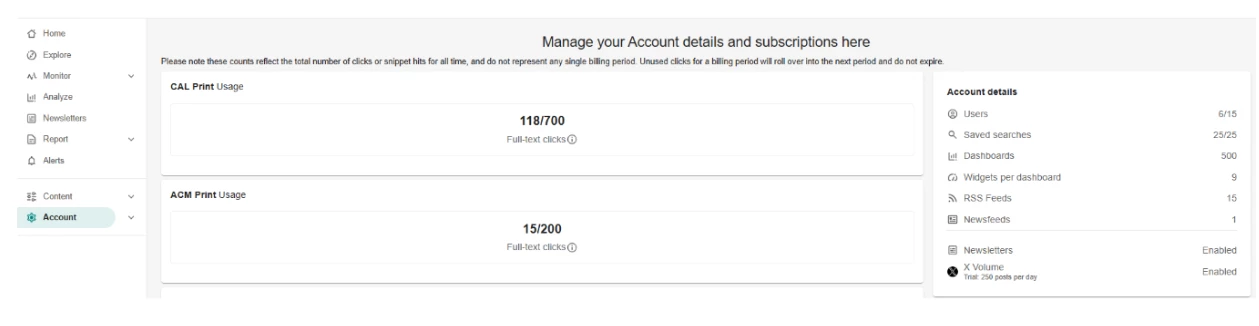
1. Click Account on the left-hand navigation menu.
2. Under Account details CAL, ACM or both will display based on your subscription with a clear counter for your current print usage.
*This usage counter is the total across your current subscription through to the end date/when a new subscription begins.
How to manage your clicks
The best way is to create a curated source list of major metros to avoid unnecessary consumption.
Follow the steps from Filter for Specific Print Sources in this article to minimize over consumption.
Frequently Asked Questions
How is reach calculated?
We've moved from circulation to readership as the primary measure of print audience, in line with broader industry standards. Readership gives a more accurate, comparable view of how many people actually engage with a publication, so this change reflects a more meaningful picture of your media coverage's true impact.
- Where available, we use readership figures reported directly by publishers or by Roy Morgan.
- Where this data isn't available, we estimate readership using the publication's circulation multiplied by a readers-per-copy (RPC) factor, which typically ranges from 2–5 depending on the publication type. Print reach figures are refreshed annually to keep pace with industry data updates.
What should I do if a Print Article is Missing?
First check that the article in definately not missed in the system. Follow the steps in the Finding Specific News Coverage
💡Remember to filter for Print in the Source Type drop-down.
If you’re still not able to locate the article, reach out to support.
How do I request for more Print Clicks?
Reach out to your Client Success Manager for more advise.