
Classic Version: Customizing Your Classic Newsletter Design Template

  • October 28, 2025
  • 4 Replies
  • 18 views
Cheyenne
mEmployee
Forum|alt.badge.img+1

Note: Classic Newsletters were the original version of Newsletters Meltwater released. Since then, we have upgraded the entire experience with our New Newsletters. If you are unsure of which version you have in your subscription, please contact your Account team.


In addition to the Default template within all Newsletters, Meltwater's team can customize the layout of your branded distributions with HTML coding.


If you would like your newsletter design template customized, please email our team at help@meltwater.com with the design features you wish to include.


This article will cover:


We also have additional industry use cases and further layout examples. Learn more at our Newsletter Center.


Design Features


If you have a Newsletter design layout that you'd like to incorporate but isn't similar to an option listed, please review if it meets the below feature criteria and reach out to our team via Live Chat to discuss how we can update your distributions.


Design template features that can be customized:

- Logos

- Images

- Fonts

- Colours

- Add social media sharing icons

- Navigation bar

- Publication Name

- Date

- Ingress (First 120 Characters)

- Lines or spacing

- List of syndicated publications

- Hit Sentence (120 Characters around the keyword matched)

-Images from articles/social posts


Classic Design


This example includes the following design features:


image.png?expires=1760487300&signature=2a5c2caaf120dec9d2ecbb73f0e8a8a6d5adb4fb3cc6b1e189a32e4564493c47&req=diEgEsh2m4ZcFb4f3HP0gCpb%2FLWM0s5ktjEUfkRbKEsirJrV%2BKzvXNUCTaGH%0Avmg%3D%0A


Social Sharing Design


This example includes the following design features:


image.png?expires=1760487300&signature=25471722e290ca09ff80b155429a018519c3b48b03511e4b7fc605964b6abff8&req=diEgEsh2moRWFb4f3HP0gKj1cR7faUFeog47UeYDfG1gun50N5UO1VNhcsuC%0AlOE%3D%0A


Simple Design


This example includes the following design features:


image.png?expires=1760487300&signature=c7ebbac2f985f703b30288cb9fd1080eac24d1308a7c8251fcd773c47025fc39&req=diEgEsh2mohdFb4f3HP0gFo7YleUnnqFOk02okanUUM4Ky4ZVMKtQSgSWKFn%0ATG8%3D%0A


Compact Design


This example includes the following design features:


image.png?expires=1760487300&signature=469d059e7ff510a86e03ab8ce30109cf4ccfb78934224866be024f46caa37764&req=diEgEsh2lYNbFb4f3HP0gLCRJ1WG2M3w9N6%2B8OTqLTcGGRHk1mcSNIGcesW9%0ACcc%3D%0A

4 replies

Maria Dehne
mChampion Level 3
Forum|alt.badge.img+63
  • mChampion Level 3
  • October 28, 2025

Thanks for this resource 


  • New Member
  • January 11, 2026

Would it be possible to enhance the way photos are displayed? Currently, they appear very small, and the layout only allows for one section. If there were two sections, the photos could be larger and more impactful.

Right now, the small size and low quality defeat the purpose of this functionality, and it doesn’t feel very modern. We hope you can help us improve this experience.


  • New Member
  • January 11, 2026

Additionally, would it be possible to allow customization of fonts? This would help us align the design with our branding and make the overall experience more engaging.


Laura Stewart
mEmployee
Forum|alt.badge.img+1

Hi ​@LGAR 

For the images

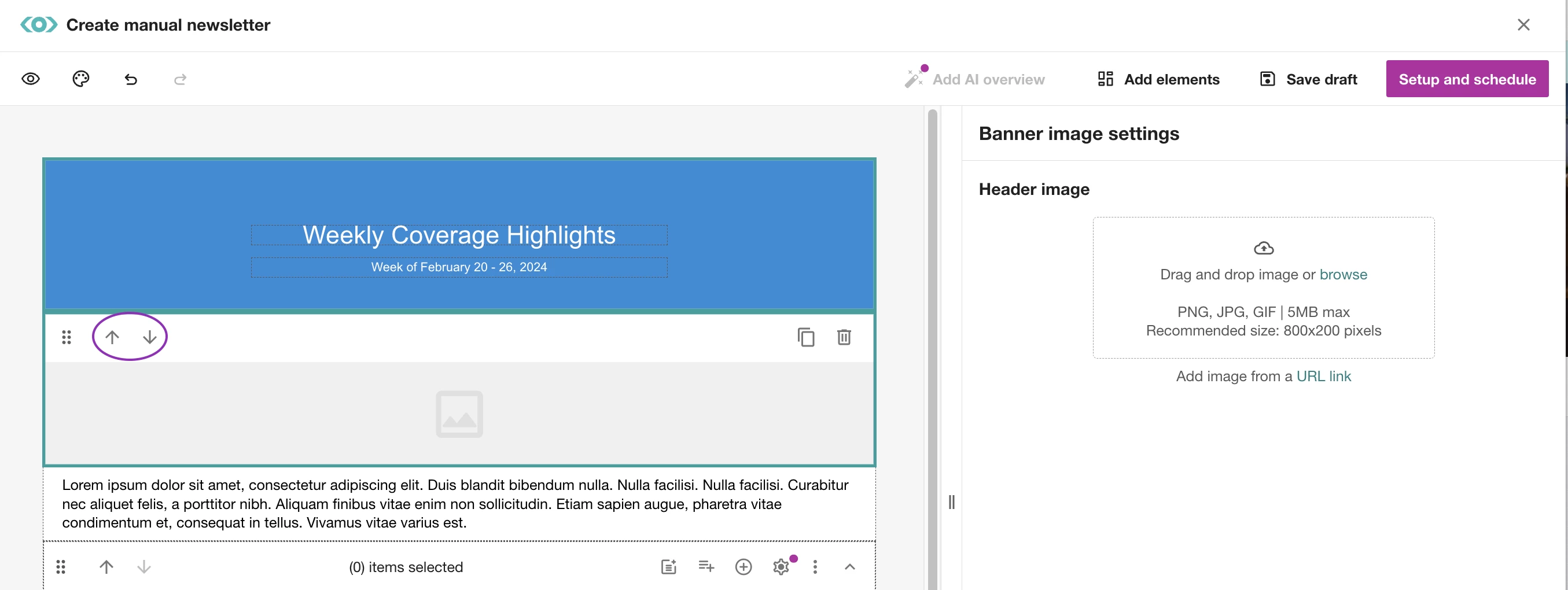
Right now, you can upload any image and use the arrows to move it up or down in the layout — this gives some control over placement. However, image size is fixed, with a recommended dimension of 800x200 pixels and 5MB max. 


This is a great suggestion however,  I’d recommend commenting or upvoting these two related product ideas:

These ideas are already on our radar, and your input will help the product team prioritize updates!


For the fonts:


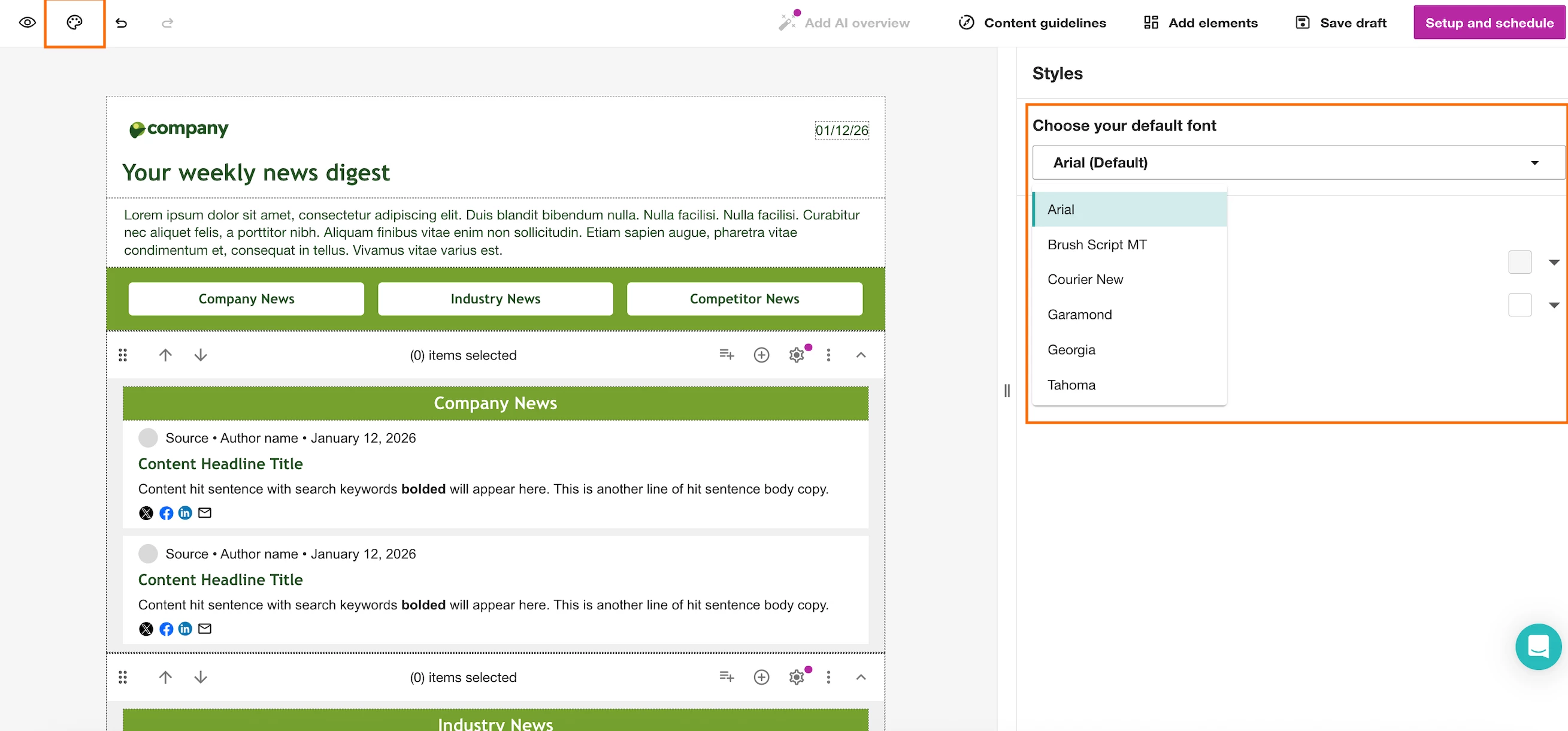
You can customize fonts by navigating to the design icon on the top left hand corner. From there the range of fonts available to you will populate in the drop down menu on the right hand side.