

Vetting influencers to ensure they are the right fit for your brand is a key step in influencer discovery. Klear provides comprehensive profile analytics, content, and insights that brands can use to vet influencers to ensure they’re on-brand and align with brand values.
Learning Objectives:
-
Understand key vetting performance metrics
-
Identify potential brand risks
-
Review previous brand partnerships and content aesthetic
-
Manage an influencer’s profile
Table of Contents:
Prerequisites
Discover New Influencers in Klear's Database
Navigating to the Influencers Tab
The Influencers tab is where you can manage and vet influencers. You can navigate to the Influencers tab from two places:
-
On the Klear homepage, click on Analyze Influencers
-
Click on Influencers in the top menu

To view an influencer’s profile from the Influencers tab:
-
Click on the influencer card or type their social profile username into the search bar. Their full profile will appear.
-
Or, type in their profile in the search bar

Alternatively, you can navigate to an influencer’s profile from other places in Klear, such as Discover, by clicking on their profile photo.

Overview Tab
On the Overview tab, there are multiple sections you should use to vet an influencer.

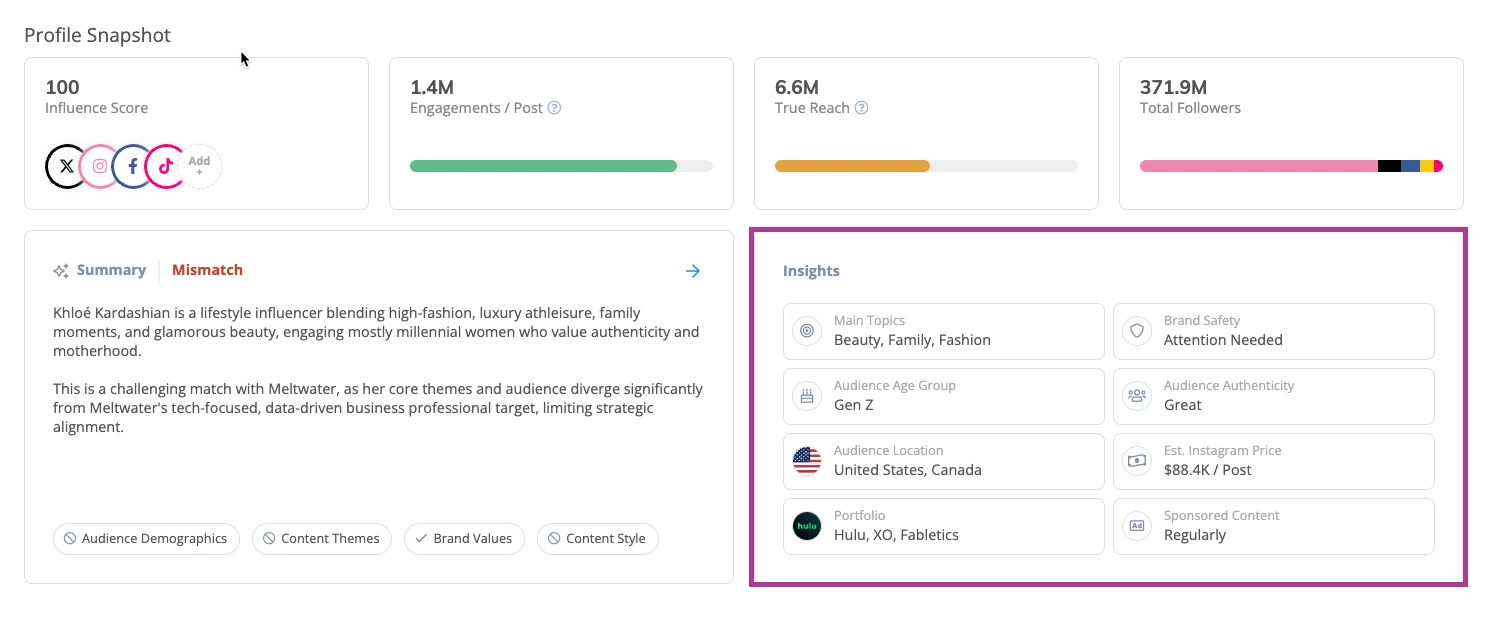
Profile Snapshot
Key performance metrics like Influence Score, Engagements/Post, True Reach, and Total Followers.
-
Click into each box to see how the performance breaks down.
- Influence Score: a global score of how influential someone is across their networks. This algorithm looks at thousands of data points, but two key factors are engagement and reach. If an influencer’s posts are getting a lot of views but not many engagements, this impacts whether their post will show up on their audiences’ discover and explore feeds.
- Engagement: the total number of engagements on average per post and network. The scale compares an influencer’s engagement to influencers with a similar audience size. Hover over a social network to see its average engagements.
- True Reach is an algorithm that analyzes the audience and their relationship with the influencer. This insight considers fake followers, inactive followers, and followers who do not engage with the influencer’s content. If a user stops engaging with a social media profile, a social channel’s algorithm limits showing the influencer’s posts in the user’s feed.
AI Summary
Tailored analysis of content style, audience alignment, and brand fit, complete with match labels for you to assess brand fit at a glance.
-
Use the insight chips to quickly understand why they’re a good match or what to watch out for.
Insights Panel
A quick view on content themes, brand safety signals, sponsorship frequency, and audience breakdowns, making it easy to validate relevance and reputation.
- Brand Safety
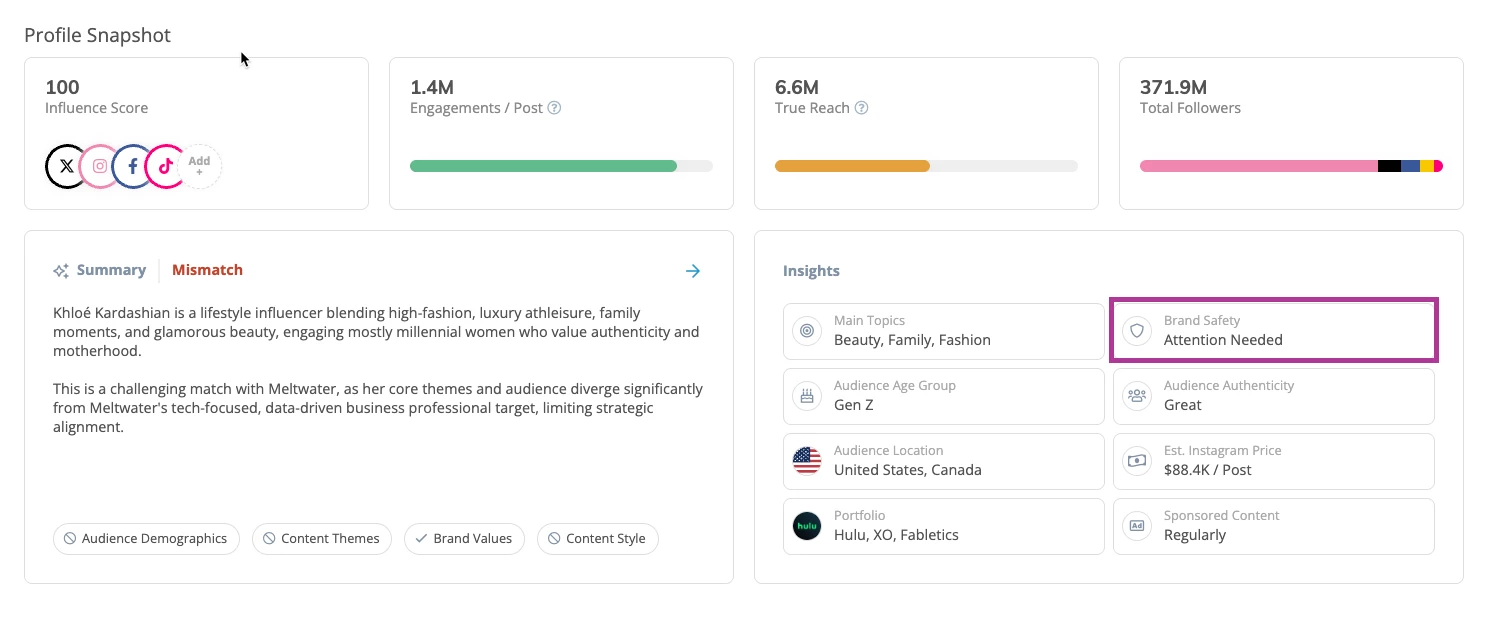
- We’ve upgraded Klear’s Brand Safety feature with advanced AI analysis that understands how influencers talk about topics—not just what they say. This update gives you a clearer, more contextual view of influencer content so you can confidently assess potential risks before starting a partnership. To use the updated Brand Safety feature, follow these steps:
- When you open an Influencer Profile, navigate to Insights
- Click Brand Safety
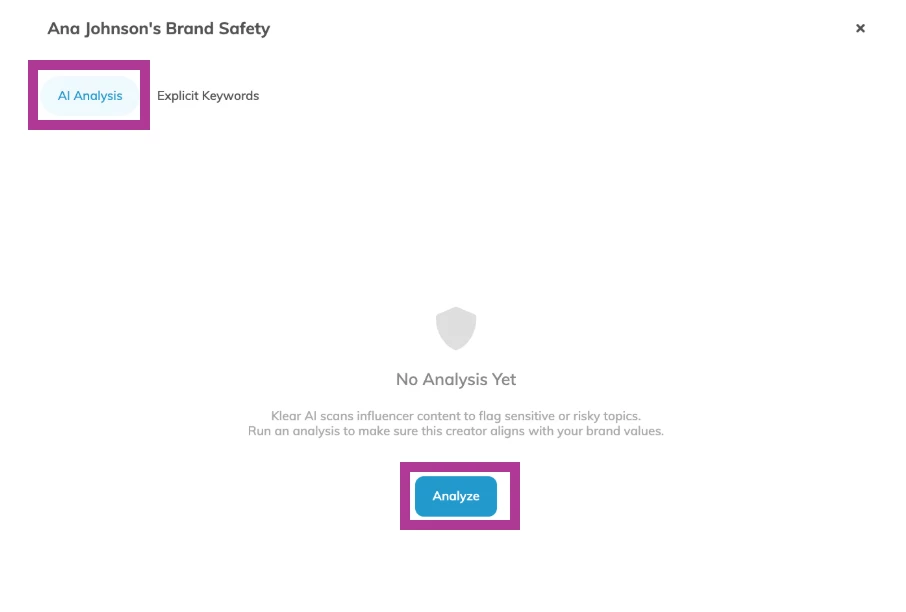
- In the AI Analysis tab, click Analyze to detect potentially harmful content using AI. The scan takes about five minutes as Klear’s AI reviews content and flags posts related to sensitive topics such as illegal activities or controversial issues.
- Results appear under AI Analysis, organized by theme. Review posts flagged by category and view the surrounding context to understand tone and relevance and if it’s a risk to your brand.
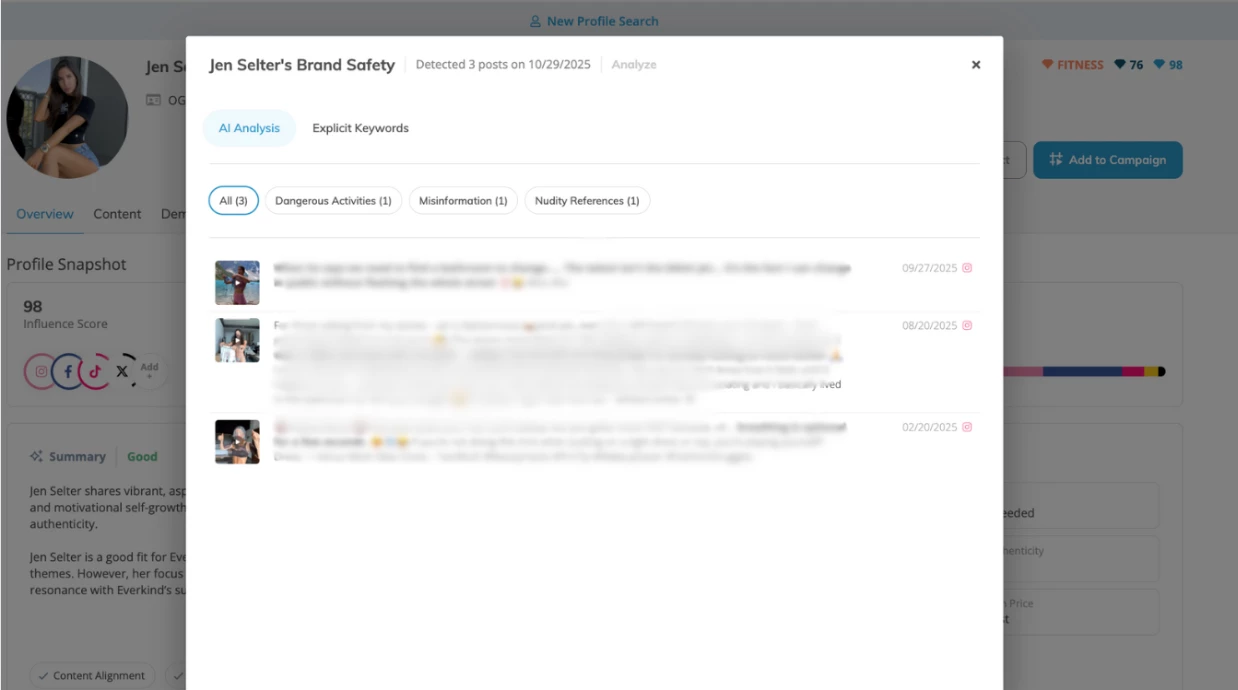
- Click into each category to see specific examples and context from the posts.
- If you need to run a new analysis on the same influencer later, you can re-analyze once enough new content is available.
-
Note: A minimum of 10 new posts is required to trigger the next scan, ensuring results stay current and relevant.
Portfolio: This is a snapshot of their brand partnerships and brand mentions. Click on a brand to see the content posted.
Audience: The overall audience size an influencer has across their social media networks. Audience size is also broken out by channel.
Understanding the size of an influencer’s audience is a key step in vetting. However, just because an influencer may have a huge following does not mean their audience is engaged with their content. An influencer with a smaller audience may have higher engagement than an influencer with a larger audience. Make sure whoever you partner with can make a maximum impact on your campaign.
Audience Demographics
Audience demographics are supported for any influencer that connects their social profile to Klear. If an influencer has not connected their social profile to Klear then we can use machine learning to infer demographics.
- Average age: displays the average age of the influencer’s audience
- Dominant gender: displays the dominant gender of an influencer’s audience
- Brand affinity: displays the brands the audience mentions in their content on social media
- Top countries: displays the top four countries in which an influencer’s audience is from
- Top cities: displays the top four cities in which an influencer’s audience is from
Average Metrics
A cross-network breakdown of followers, reach, engagement, and EMV, giving you a practical view of how they perform across channels.
Top Content Gallery: Scroll through best-performing posts to assess tone, creativity, and engagement.
-
Filter by Portfolio, Topics, or Top Content to find what matters most.
Audience Demographics
Get detailed insight into location, age, interests, gender, and brand affinities. Perfect for validating audience fit.
Similar Influencers: Discover AI-powered suggestions for creators with similar content, perfect for expanding your shortlist.
Content Tab
The content tab helps you understand the type of content an influencer posts that perform well, the brands they mention, and their general content aesthetic.
There are two sections in the content tab: Top Content and Portfolio.
Top Content
Top Content displays the most engaging content an influencer has created across all social media networks.
To view top content based on topic, click each topic, and the content displayed will reflect the topic selected.

Click on the content to view it, and a pop-up will appear. Here you can view the visual content, associated text, and engagement metrics. This will give you a good idea of the influencer’s content that performs well, and you can understand if this type of content would be an ideal fit for your brand.
There are multiple ways you can view and sort this content.

-
To view content by social media profile, click on the social media network.
-
To sort the order of the content, click the Sort By drop-down and select one of the following options: Top Content (default), Recent in 6 months, Recent in 3 months, Recent in 1 month, and Date.
-
Use the keyword search to find top content that mentions specific keywords.
Portfolio
Click on the Portfolio tab to view an influencer’s portfolio. The portfolio contains their brand partnerships and brand mentions.

-
By default, the influencer’s portfolio is sorted by All Brands. To view portfolio content for a specific brand, click on the brand name.
-
You can filter this content by the following options: All Time, 1 Year, 6 Months, 3 Months, 1 Month, and Sponsored Only.
Demographics Tab
Audience demographics are supported for any influencer that connects their social profile to Klear. If an influencer has not connected their social profile to Klear then we can use machine learning to infer demographics.
For influencers who have demographic data available, you can see the following high-level insights:

-
The dominant gender of an influencer’s audience
-
The average age of the influencer’s audience
-
The top country in which an influencer’s audience is from
-
The top skill an audience has based on the content they post and the engagement they receive
Next, you can see the insights for various demographic categories belonging to the influencer’s audience. By default, the top four will display. If more than four data points are available, hover over the insight and click Expand.
-
Age breakdown of the influencer’s audience
-
Gender breakdown of the influencer’s audience
-
Influence levels of the influencer’s audience
-
Top countries in which an influencer’s audience is from
-
Top states in which an influencer’s audience is from
-
Top cities from the top country in which an influencer’s audience is from
-
Top interests the audience has based on the content they engage with
-
Top brands the audience mentions in their content on social media
-
Most popular hashtags the audience uses in their content
-
Most relevant hashtags the audience engages with


Analytics Tab
Includes channel-level insights on historical performance, reach, and engagement trends across networks like Instagram, TikTok, YouTube, Facebook, and more.

Platform-specific performance metrics, including:
-
Followers
-
Likes, Comments, Shares
-
Engagement Rate
-
Reach
-
Earned Media Value (EMV)
Visual trend graphs that track:
-
Follower growth
-
Average views and engagements over time
Post-level performance patterns for each network -
Instagram Stories data (where available), providing short-form content insights like story reach, engagement rate, and EMV
Similar Tab
Similar Influencers features a list of influencers who have posted content similar to the influencer you are reviewing. Powered by AI visual analysis, the data in Similar Influencers has been enriched to surface more relevant matches for easier discovery.

-
Click on an influencer’s image to open their profile. Note: this will navigate you away from the influencer profile you are currently viewing.
-
Click Similar Content on an influencer’s profile card to view their exact pieces of matching content.
-
Use the filters on the right-hand side to refine your results using Influence, Location, and Gender parameters.
-
Use the action options within each influencer results, to add an influencer to a campaign, add a tag, or send an outreach email from the Similar Influencers list.
FAQs
Why are Deleted Posts appearing in an influencer’s portfolio?
If an influencer deletes content, Klear must remove it as per a social network’s terms of service. Many influencers' campaign contract terms specify the duration a piece of content needs to be posted and when the influencer can delete it. Many influencers remove this type of content after their contract has expired.
In some cases, an Influencer may have disabled embedding for their Instagram account. This will inhibit Klear from displaying the creator's content on the platform as they have revoked permission to host their content on third-party websites.
Alternatively, the post could be restricted due to Instagram's age settings. Some content is only visible to users who meet certain age requirements, so if a post or account is marked with age restrictions, it won’t display in our platform and will appear as deleted. This is controlled by Instagram and affects any third-party platform accessing the data. Learn more about Navigating Posts Showing As Deleted.
Why does YouTube have its own Influence section?
YouTube metrics are in a separate section due to YouTube’s terms of service that require them to be standalone.
Why is audience demographic data not showing?
If audience demographic data is not showing it means either that influencer has not connected their social profile to Klear or we are not able to apply inferred demographics. When demographic data is not showing for a profile we recommend you consider inviting them to authenticate their profile on the platform.
What is an influencer pod?
Influencer pods are public and private forums where creators (typically nano and micro) exchange likes, follows, and comments in order to increase their social media presence.
Each pod has its own set of guidelines that members must adhere to (i.e. number of daily likes, content limitation, follow for follow). Members of pods range across all categories. Every day the group has a comment or like thread, which closes at a specific hour. The thread has clear guidelines and is aimed to help everyone in the group grow their following. And, pod members promote their own page, ask for likes and comments, and promise to return the favor.