




AI Prompt Challenge: Build Your Year-End Performance Report in 15 Minutes
Our monthly competitions are back! 🎉
We had such a strong response to the 90-day prompt challenge that we’re turning it into a monthly ritual.
Why run these every month?
Some of you want to sharpen your prompting skills. Others want to feel more confident using AI in your day-to-day work. These challenges give you simple ways to practice, swap ideas with peers, and build your skills over time.
December Challenge: Build Your Year-End Brand Performance Report 📊
Every PR and comms team needs a clear, data-driven wrap-up at the end of the year. This month, you’ll build yours in Mira Studio or the Meltwater Agent for Microsoft using a guided sequence. By the end, you’ll have a polished Year-End Brand Performance Summary Report ready to use with your team.
⭐️ If you don’t have Mira Studios, you can sign up for a free 90 day trial, complete this form.
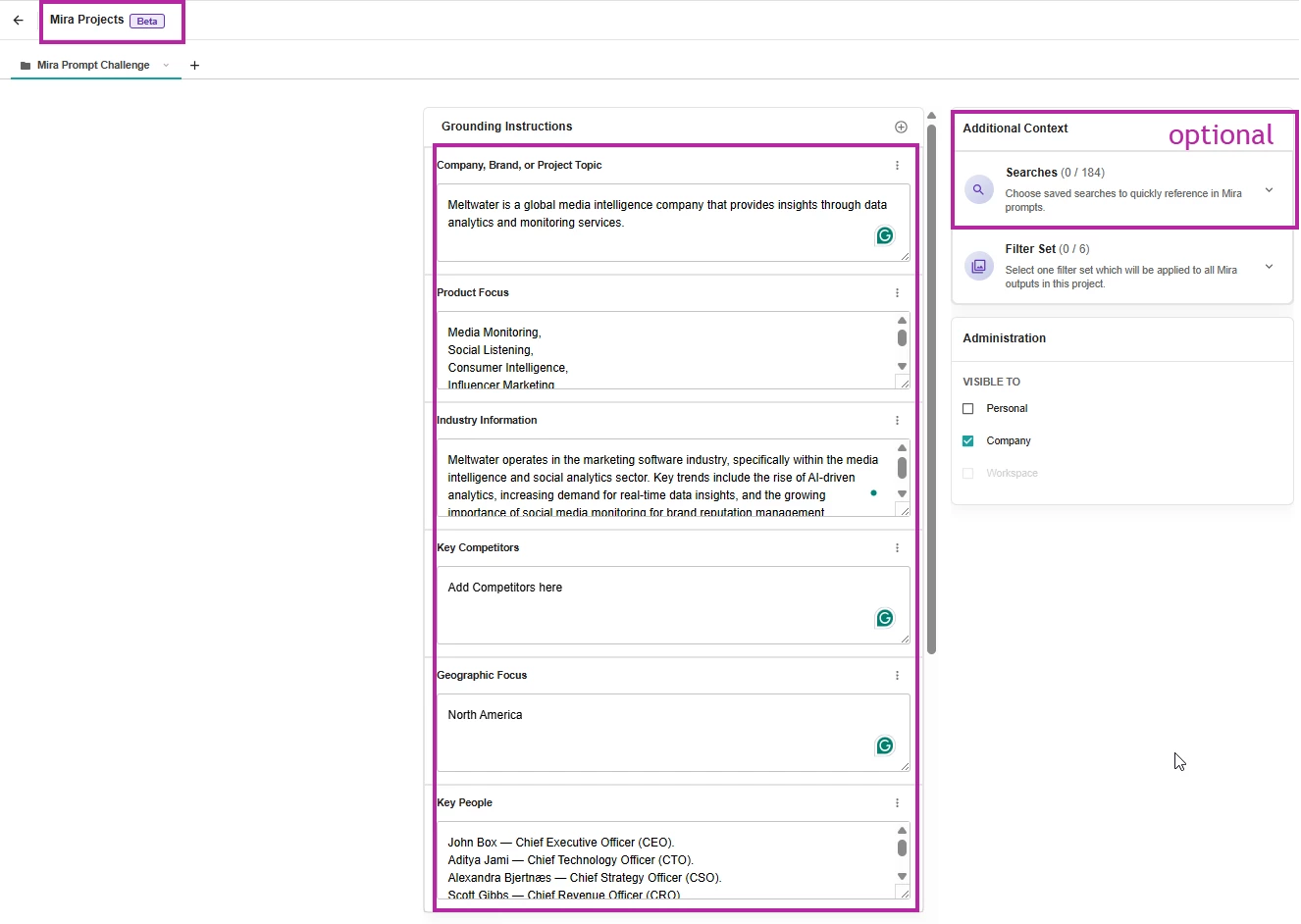
Step 1: Set Up Your Project in Mira Studio
Start by creating a new project for your company or brand in Mira Studio or in the Meltwater Agent for Microsoft. This ensures the report pulls from the right context.
Add the following:
- Company, Brand or Topic: Add your brand name
- Key Competitors: Add the competitors you benchmark against
- Key People: Include leaders you track, such as your CEO
- (optional) Saved Searches: Add any saved searches you use for reporting throughout the year to keep your report consistent
Step 2: Run the Prompt Sequence
Before entering any prompts, make sure you:
- Select the project you just created (top left)
- Switch to Canvas Mode (top right)
This guided sequence helps Mira build your full report section by section.
Prompt Sequence:
In the Mira Studio’s prompt box copy and paste each of the prompts one at a time, waiting for content to load before adding the next prompt.
Prompt 1: Executive Overview
I'm producing a Year-End Summary report with the title: Year-End Review: Key Highlights and Performance Insights for 2025. Create an Executive Overview: Summary of my brand’s overall performance in North America across news and social media in 2025. Key highlights and lowlights, including major achievements, challenges, and milestones.
(Wait for content to load.)
Prompt 2: Share of Voice
Give me: Overview of Share of Voice (SOV) in earned media against key competitors using engagement as the measure. Provide a comparison of SOV metrics between January 2025 and now in a table.
(Wait for content to load.)
Prompt 3: Key Narratives
Key Narratives: Highlight any prominent changes in narratives about my brand over the course of the year. Give me a section on positive narratives and one on negative.
(Wait for content to load.)
Prompt 4: Coverage Sentiment
Coverage Sentiment: Analysis of sentiment trends across the year, highlighting key positive and negative drivers. Show comparison of sentiment breakdown (positive, neutral, negative) between January 2025 and now in a table.
(Wait for content to load.)
Prompt 5: Key Stakeholders
Key Stakeholders: Coverage analysis of our key stakeholders this year, highlighting any major stories with citations for each stakeholder or report no coverage if that’s the case.
(Wait for content to load.)
Prompt 6: Positive Moment
Provide an “and finally” section highlighting one key positive moment for our brand over the course of the year with any relevant citations.
(Wait for content to load.)
Prompt 7: Build the Report
Take the output of these six prompts and create a complete year-end summary report.
Step 3: Comment on your experience
-
Follow the steps above to create your year-end report.✨
-
Comment on this post with what you learned or any surprises.
-
You’ll receive your December AI Prompt Challenge Community Badge at month-end. (Challenge ends on December 31, 2025)
Bonus: Share any additional prompts you found useful while preparing your year-end reporting.
Special thanks to our VP of Product Management with his help on this one