




Three Ways to Build Your First Media List in Meltwater

Ready to start pitching? You need a media list first. Here's how to build one. Pick whichever approach fits how you work.
Let Meltwater find journalists for you
This is the fastest path if you're starting from scratch. PR Assistant lets you draft your pitch and surface relevant media contacts at the same time.
- Open Media Relations in the left navigation and select PR Assistant
- Enter your key messages or a draft pitch, then choose your format, length, and tone
- Select Generate. Your draft will appear on the right
- Click Suggested Journalists to see contacts matched to your content
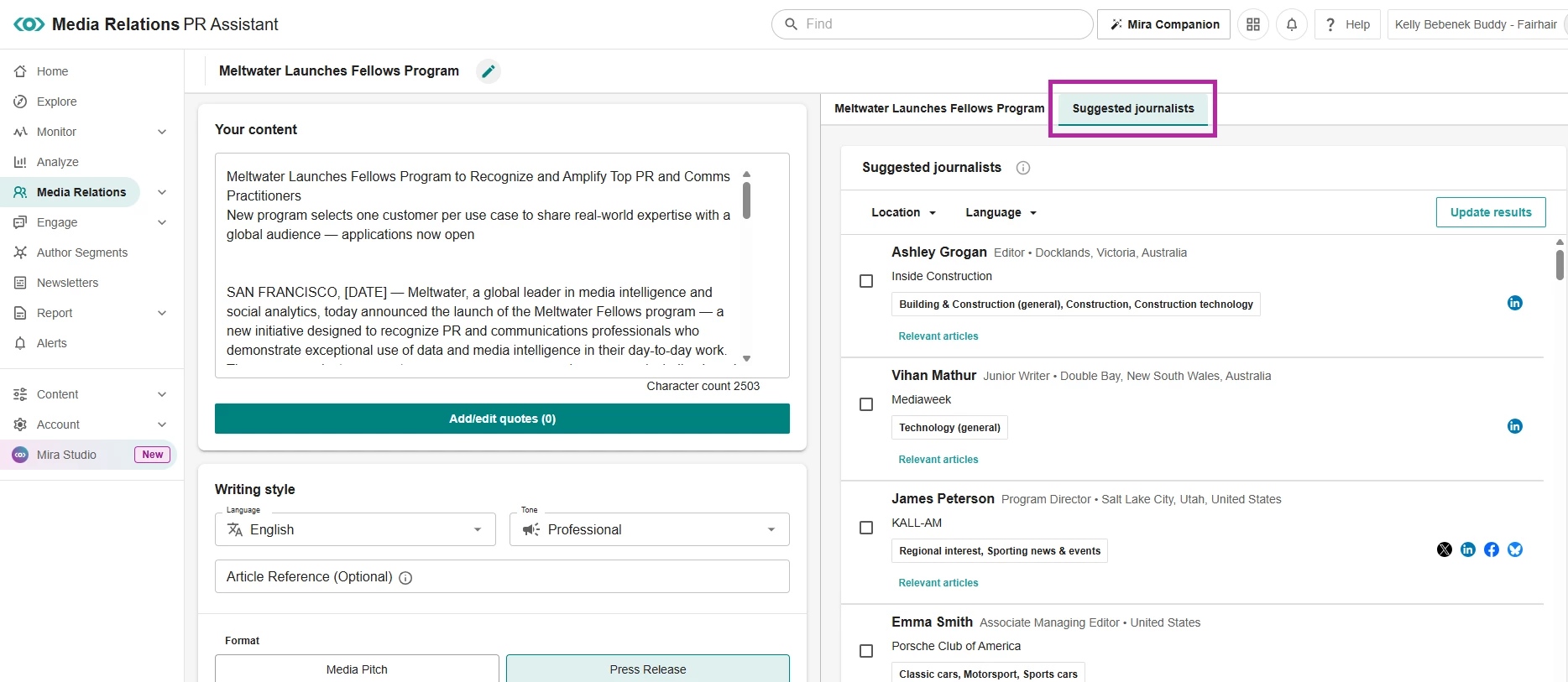
- Select the journalists you want and click Add to list
Import your existing contacts
Already have a contact list from another tool or a spreadsheet? Upload it as a CSV file and it'll be ready to use in Outreach right away.
How to import a Media List
Build a list manually
Prefer to search the database and curate your own list from scratch? You can browse by beat, outlet, location, and more.
Which approach did you go with? If you've already built your first list, drop a comment and let us know how it went. And if you're stuck deciding, our live drop-in sessions run every weekday where a team member can help you figure out the best fit.