

AI Prompt Challenge: Build Your Year-End Performance Report in 15 Minutes
  • December 2, 2025
  • 35 Replies
  • 3126 views
kelly.bebenek
mEmployee
Forum|alt.badge.img+10

Our monthly competitions are back! 🎉


We had such a strong response to the 90-day prompt challenge that we’re turning it into a monthly ritual.


Why run these every month?
Some of you want to sharpen your prompting skills. Others want to feel more confident using AI in your day-to-day work. These challenges give you simple ways to practice, swap ideas with peers, and build your skills over time.


December Challenge: Build Your Year-End Brand Performance Report 📊


Every PR and comms team needs a clear, data-driven wrap-up at the end of the year. This month, you’ll build yours in Mira Studio or the Meltwater Agent for Microsoft using a guided sequence. By the end, you’ll have a polished Year-End Brand Performance Summary Report ready to use with your team.
 

⭐️ If you don’t have Mira Studios, you can sign up for a free 90 day trial, complete this form.


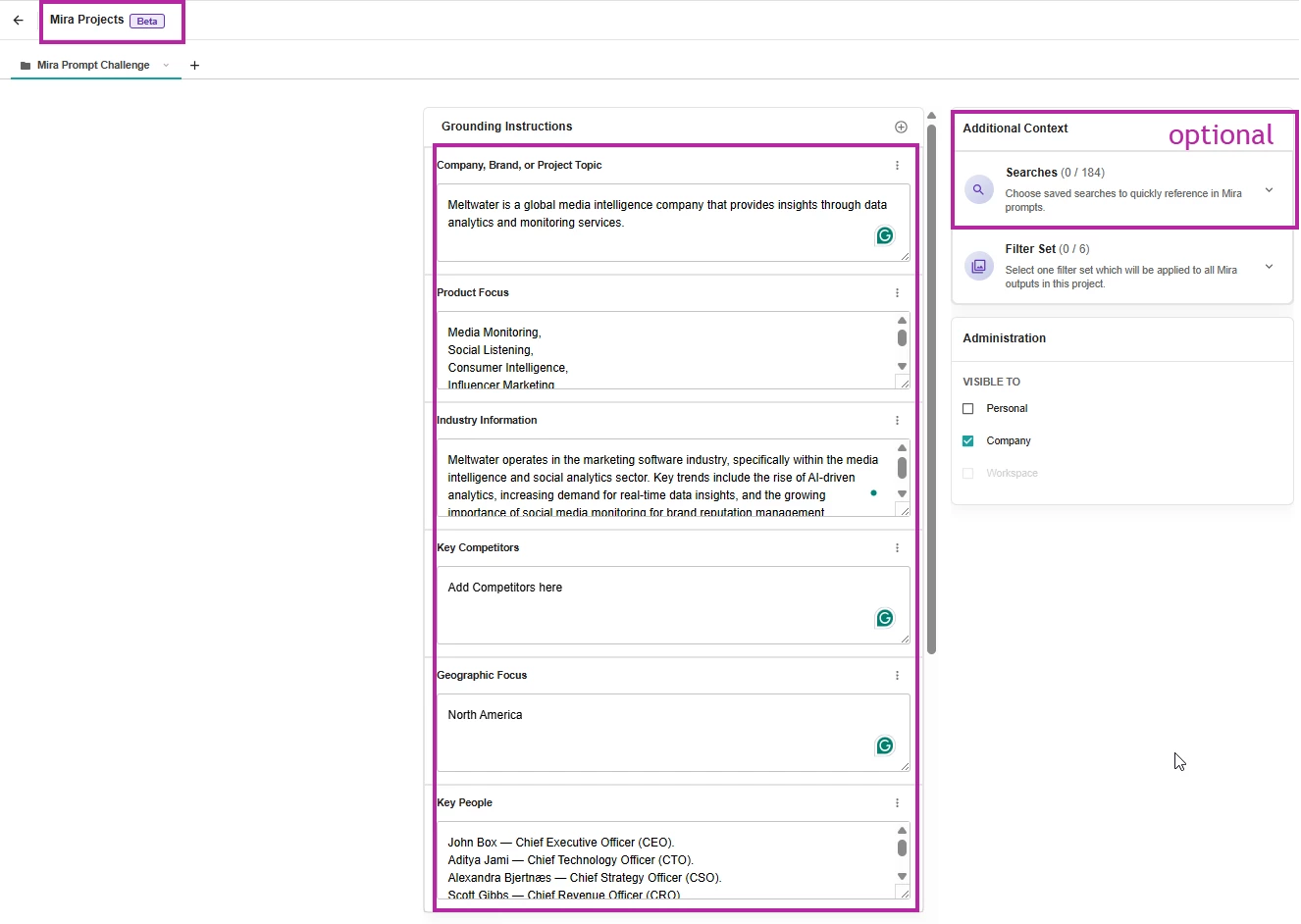
Step 1: Set Up Your Project in Mira Studio


Start by creating a new project for your company or brand in Mira Studio or in the Meltwater Agent for Microsoft. This ensures the report pulls from the right context.

Add the following:

  • Company, Brand or Topic: Add your brand name
  • Key Competitors: Add the competitors you benchmark against
  • Key People: Include leaders you track, such as your CEO
  • (optional) Saved Searches: Add any saved searches you use for reporting throughout the year to keep your report consistent


Step 2: Run the Prompt Sequence


Before entering any prompts, make sure you:

  1. Select the project you just created (top left)
  2. Switch to Canvas Mode (top right)

This guided sequence helps Mira build your full report section by section.
 

Prompt Sequence:


In the Mira Studio’s prompt box copy and paste each of the prompts one at a time, waiting for content to load before adding the next prompt.


Prompt 1: Executive Overview

I'm producing a Year-End Summary report with the title: Year-End Review: Key Highlights and Performance Insights for 2025. Create an Executive Overview: Summary of my brand’s overall performance in North America across news and social media in 2025. Key highlights and lowlights, including major achievements, challenges, and milestones.

(Wait for content to load.)
 

Prompt 2: Share of Voice

Give me: Overview of Share of Voice (SOV) in earned media against key competitors using engagement as the measure. Provide a comparison of SOV metrics between January 2025 and now in a table.

(Wait for content to load.)
 

Prompt 3: Key Narratives

Key Narratives: Highlight any prominent changes in narratives about my brand over the course of the year. Give me a section on positive narratives and one on negative.

(Wait for content to load.)
 

Prompt 4: Coverage Sentiment

Coverage Sentiment: Analysis of sentiment trends across the year, highlighting key positive and negative drivers. Show comparison of sentiment breakdown (positive, neutral, negative) between January 2025 and now in a table.

(Wait for content to load.)
 

Prompt 5: Key Stakeholders

Key Stakeholders: Coverage analysis of our key stakeholders this year, highlighting any major stories with citations for each stakeholder or report no coverage if that’s the case.

(Wait for content to load.)
 

Prompt 6: Positive Moment

Provide an “and finally” section highlighting one key positive moment for our brand over the course of the year with any relevant citations.

(Wait for content to load.)
 

Prompt 7: Build the Report

Take the output of these six prompts and create a complete year-end summary report.


Step 3: Comment on your experience


  1. Follow the steps above to create your year-end report.

  2. Comment on this post with what you learned or any surprises.

  3. You’ll receive your December AI Prompt Challenge Community Badge at month-end. (Challenge ends on December 31, 2025)

​​​​
Bonus: Share any additional prompts you found useful while preparing your year-end reporting.
 

Special thanks to our VP of Product Management with his help on this one ​@antcousins

35 replies

Forum|alt.badge.img+3

I liked the prompt and the description, really helpful! It would be great, if it was possible to download the whole review as one. Did I miss this or is it indeed only possible to dowload/ copy each prompt´s answer one by one?

Thanks!


Minna_Tuum
Influencer
Forum|alt.badge.img+7
  • Influencer
  • December 3, 2025

This is all both super interestin and extremely frustrating 😆

I have constantly had the same problem. Mira for some reason can’t access any data on LinkedIn. Is anyone else strggling with the same issue? I can get an analysis on our earned media visibility on various media platforms, and with a little ewncouragement Mira finally found data from Facebook and Instagram, but nothing from LinkedIn, which is our main platform where our people interact with us and where our data is shared.

Perhaps this challenge isn’t meant to include social media, but it would be very helpful if it did. But I’m going to keep on trying!


Sofie KH
Influencer
Forum|alt.badge.img+16
  • Influencer
  • December 3, 2025

Very interesting, I've learned some new things! Setting up a project in Mira Studio, for example, was new to me, but definitely interesting to explore further. I will definitely use the prompt sequence, thank you!


AliceBG
Influencer
Forum|alt.badge.img+4
  • Influencer
  • December 3, 2025

This is such a massive time-saver! Thanks for laying it out so simply!


I hit a couple of stumbling blocks:

  • identifying the wrong spokespeople and quoting results from sports outlets rather than data/AI related
  • hallucinating job roles and remit
  • had to restart the process after an error at step 5

kelly.bebenek
mEmployee
Forum|alt.badge.img+10
  • Author
  • mEmployee
  • December 3, 2025

@Carolin  Did you use prompt 7 - this would turn it into 1 complete report? Let me know if it didn’t work.


kelly.bebenek
mEmployee
Forum|alt.badge.img+10
  • Author
  • mEmployee
  • December 3, 2025

@AliceBG Let me flag this to the product team, I will come back to you.


kelly.bebenek
mEmployee
Forum|alt.badge.img+10
  • Author
  • mEmployee
  • December 3, 2025

@Minna_Tuum I’m looking into this for you, will come back when I have an answer.


Forum|alt.badge.img+3

@Carolin  Did you use prompt 7 - this would turn it into 1 complete report? Let me know if it didn’t work.

Yes, I did. For some reason I still was only able to see promt result, after prompt result. Maybe a temporary issue.. :)


DEClarke
mChampion Level 3
Forum|alt.badge.img+51
  • mChampion Level 3
  • December 3, 2025

I gave this a try for one of my clients, and I think it created a pretty valuable report. My agency doesn’t have access to Mira Studio, but I was able to use Mira Companion to create this report, using the suggested prompts. I have attached it for your review as well.

For me, the only changes I would want to make before presenting this to my client are:

  1. Replacing the NewsBreak link with the link to the original coverage (not the syndication). So, I would ask Mira to replace NewsBreak with Food & Beverage Magazine.
  2. Ask Mira if there is a way to keep the information noted re: the New York Times piece but explain that the negative angle is about the U.S. Domestic Beef Industry as a whole and NOT about my client being quoted in the NYT, which is certainly the highlight of my pitching for him this year.

kelly.bebenek
mEmployee
Forum|alt.badge.img+10
  • Author
  • mEmployee
  • December 3, 2025

@Carolin Ameskamp Are you in Canvas mode? (top right toggle)


Maria Dehne
mChampion Level 3
Forum|alt.badge.img+64
  • mChampion Level 3
  • December 3, 2025

Thanks for this step-by-step tool! Appreciated the continuing chance to practice setting up a project, editing it, etc. I found the Executive Overview prompt very insightful. And each results from the prompts were thorough. As far as additional prompts, I tried one that provided a visualize of engagement metrics and trending healthcare topics.  


Forum|alt.badge.img+7
  • Influencer
  • December 3, 2025

This was a cool experience! Overall, I think the final report was good considering I didn’t change a single prompt that was listed in the directions. However, there were a few lapses that I had to take care of with additional prompts (picking up stories from a company that has our same name although I tried to fix that at the beginning; not recognizing my CEOs name in stories that mention him; misunderstanding product “ updates” vs “launches”, etc.). But like I said, this was really good overall and saved me hours and hours of work. It’s a great building block for me to finalize a Year-In-Review report for my executive team. 


Forum|alt.badge.img
  • mEmployee
  • December 4, 2025

This was a cool experience! Overall, I think the final report was good considering I didn’t change a single prompt that was listed in the directions. However, there were a few lapses that I had to take care of with additional prompts (picking up stories from a company that has our same name although I tried to fix that at the beginning; not recognizing my CEOs name in stories that mention him; misunderstanding product “ updates” vs “launches”, etc.). But like I said, this was really good overall and saved me hours and hours of work. It’s a great building block for me to finalize a Year-In-Review report for my executive team. 

Hi Dan, did you try adding your CEO’s name and title to the ‘Key People’ section in the Project you use for this prompt?


Forum|alt.badge.img
  • mEmployee
  • December 5, 2025

Just wanted to say thanks for all the comments on this help guide, it’s been really useful to think about how we structure this particular sequence of prompts but also for how we approach prompt sequences in general. Appreciate it.

Ant


Will Swope
mChampion Level 3
Forum|alt.badge.img+54
  • mChampion Level 3
  • December 5, 2025

This is a great step by step explainer. I have not used Mira Projects and this has enormous potential for year-end reporting on multiple topics. Out of curiosity, once you build these report compilations, can you ask Mira to compare them? ​@kelly.bebenek do you happen to know the answer or can you ask? This is all going to be very helpful for projects and reports that I frequently run and could use prompts to generate insights that are relevant to me, my team or senior leadership. The SOV charts were a good visual that was very easy to generate.


kelly.bebenek
mEmployee
Forum|alt.badge.img+10
  • Author
  • mEmployee
  • December 5, 2025

@Will Swope I am glad this will be useful. So are you thinking you support 2 brands under 1 company and you want to compare the projects?  Or what you are thinking of comparing? I am trying to understand the use case, are you thinking about Mira creating reports for you (outside of the above) and you want Mira to provide a comparison on it?

The SOV charts show a comparison with your brand compared to the competitors listed in the project.


Will Swope
mChampion Level 3
Forum|alt.badge.img+54
  • mChampion Level 3
  • December 5, 2025

@kelly.bebenek Great questions, and I can see potential in a few different ways. It would likely be similar themes, brands or campaigns from the states that I support. 


I run similar campaign reports for beef councils in different states. I could see ways a Mira Project like this could be built to run results for each campaign, then on a national basis, Mira might be able to gain insights into what worked (or didn’t work) in certain states compared to others and help from a national perspective to offer guidance for next year’s campaign.

On the issues side, it might want to see a report for an issue in a certain state, then through some of the prompt from the challenge, compare and contrast those insights to help guide the crisis management plan from the national level.

I like your idea on looking at it as one report and listing each of these under the company or brand in one project. I have quite a few year end reports coming up and I might run a few tests under one project and see what Mira shows me.


kelly.bebenek
mEmployee
Forum|alt.badge.img+10
  • Author
  • mEmployee
  • December 8, 2025

@Minna_Tuum Does your Explore searches include LinkedIn data? 


kelly.bebenek
mEmployee
Forum|alt.badge.img+10
  • Author
  • mEmployee
  • December 8, 2025

@Will Swope The product team is discussing some of those use cases this week, I will let ​@antcousins comment once some decisions are made on what will be possible.  


Forum|alt.badge.img
  • Explorer
  • December 8, 2025

I find using the brand report under Analyze much easier to use but I do appreciate the ability to compile several prompts into a report. 


KatieAllodi
Influencer
Forum|alt.badge.img+11
  • Influencer
  • December 8, 2025

Appreciate the example prompts in a step-by-step format! I learned about the ability to create saved projects in Mira. I had to refine some of the prompts, like asking for a bar chart and comparing it to 2024, then having it reformat the chart so there were only 12 columns not 24. The data doesn’t seem to match our YOY dashboard though...if we have 8k mentions for the year, I'm not sure why it’s pulling 25,000 for one month.

Mira’s chart:


YOY Dashboard:


Laura Stewart
mEmployee
Forum|alt.badge.img+1

Hi ​@KatieAllodi thanks for sharing your findings, the generated charts are a real time saver, great call out that you can ask MIRA to modify the charts. 


For the data discrepancy it appears the top bar chart is measuring engagement metrics and the bottom charts are looking at the number of metrics. This would likely account for the difference. 


Forum|alt.badge.img+6
  • Influencer
  • December 9, 2025

Thank you so much for this as we look to summarize 2025 for our stakeholders. The results I received from these prompts were comparing January 2025 to December 2025 - month for month. What should I be changing in the prompts so it’s looking at all the data in 2025, not just the two months?


kelly.bebenek
mEmployee
Forum|alt.badge.img+10
  • Author
  • mEmployee
  • December 9, 2025

@Karna.Fronden I would update the initial prompt or the Share of Voice prompt “with include monthly breakdowns/comprehensive metrics for each month of 2025.”


Forum|alt.badge.img+6
  • Influencer
  • December 9, 2025

@Karna.Fronden I would update the initial prompt or the Share of Voice prompt “with include monthly breakdowns/comprehensive metrics for each month of 2025.”


Thanks so much ​@kelly.bebenek - it wasn’t just for SOV. It was also for Coverage Volume, Coverage Sentiment.