




Naughty or Nice? Let Sentiment Be the Judge

The holiday season is full of feelings, and the internet is no exception.
Whether your brand is spreading cheer or facing some coal-in-the-stocking moments, sentiment helps you see how people really feel about you online.
Let’s unwrap how sentiment works in Meltwater and how to spot when things are going jolly... or sideways.
🔎 Step 1: Start by Tracking the Right Mentions
Let’s say you're a media brand like Hallmark, known for your snow-filled movie marathons and emotional plotlines. Before diving into sentiment, start by tracking your most relevant keywords and mentions.
🔍 Head to Explore and start a search for your brand. If you're Hallmark, you could ask the AI Search Assistant to help you build one that captures holiday mentions, like:
-
"Hallmark Channel" -
"Hallmark Christmas movies" -
"Hallmark movie" AND review -
"Hallmark" AND (cheesy OR "love it")
Advanced Search Example:

Keyword Search Example:

Now you’re ready to see if the results make sense!
🎅 Step 2: See If You're Making the Nice List
Now that you're tracking mentions, it's time to see what the internet really thinks.
In the content stream, scroll through your results to view the sentiment next to each mention — you’ll see it labeled clearly as:
-
Positive
-
Neutral
-
Negative
-
Not Rated (if it couldn’t be classified)
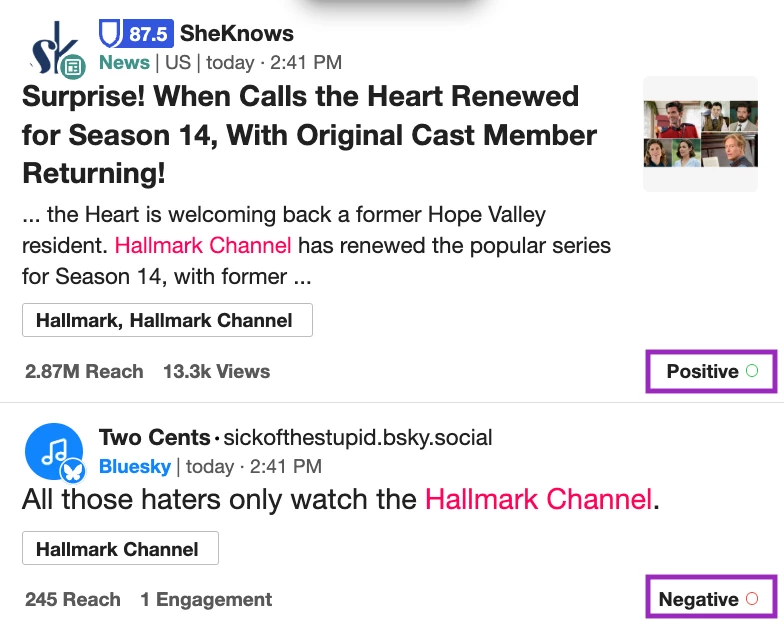
This is your first peek at whether people are feeling the good about your brand… or if they think you've recycled that plot one too many times.
🧠 How does this work? Meltwater uses AI-powered natural language processing to analyze tone, it's not just keywords, it’s the context too. Learn how it works by reading our Assigning Sentiment article.
Once you’re happy with your results, go ahead and Save your search to keep it handy and use in the next step!
📊 Step 3: Spot Trends in Sentiment
Want the big-picture view? Build a dashboard in Analyze to track sentiment over time.
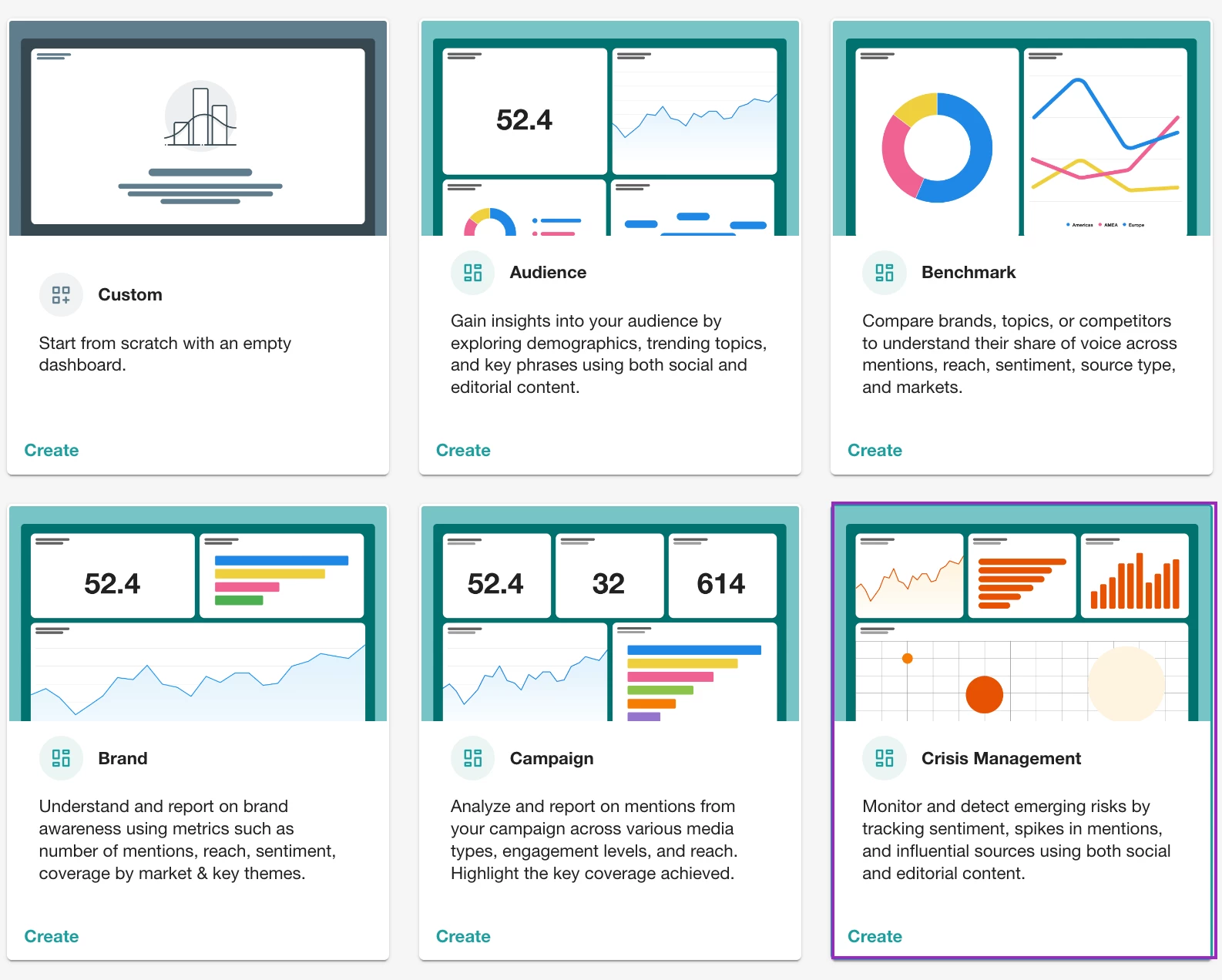
While a Brand or Campaign Report gives you a great starting point, you may not guess it — but the Crisis Management Report template is actually one of the best tools for tracking sentiment trends.
Why? Because it's stacked with widgets that help you:
-
Visualize spikes in negative mentions over time
-
Spot which keywords are fueling negative chatter
-
Break down emotions like joy, anger, or confusion in a click
-
See which sources or authors are spreading negativity the fastest
Here’s what the widgets show you:
-
Emotions Expressed
Breaks down the dominant emotions in your mentions (like joy, disgust, anger, etc.).
▸ Are people raving, roasting, or just confused? -
Sentiment by Source Type
Compares sentiment across different channels like social, news, blogs, and more.
▸ Is the negativity coming from News journalists or TikTok? -
Sentiment Trend Over Time
Tracks how sentiment shifts day by day.
▸ Is this a one-day dip or a full-on holiday meltdown? -
Total Average Sentiment
Gives your overall sentiment score (net sentiment).
▸ Are we holding steady or heading into damage-control mode? -
Most Frequent Topics – Negative Mentions
Highlights the key themes that appear most often in negative posts.
▸ What topics are behind the unhappy chatter? -
Sources with Most Negative Mentions
Shows which publications or platforms are generating the most negative buzz.
▸ Where is the backlash coming from?
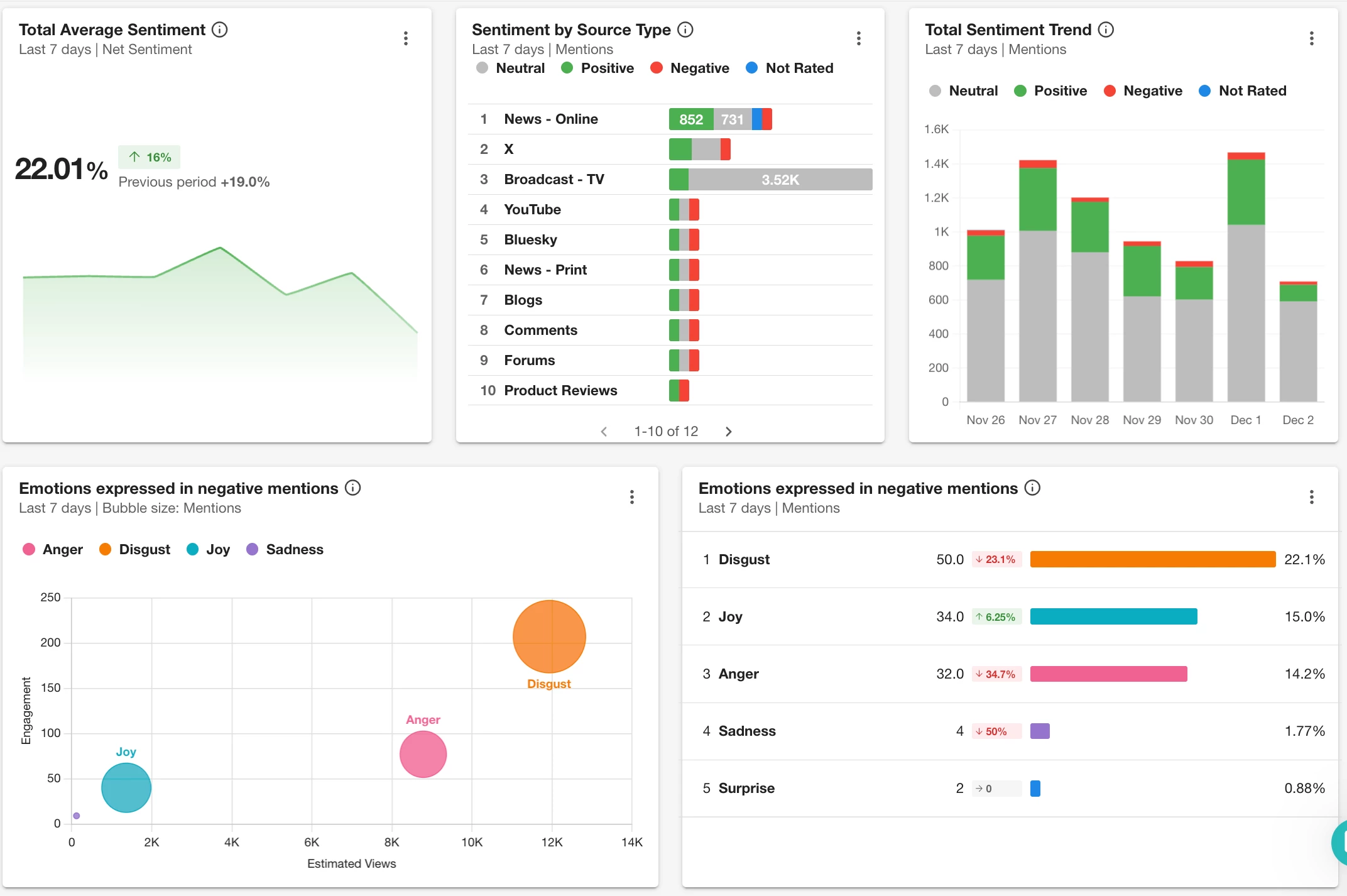
All together, it gives you a clear, quick pulse on how your audience is feeling. Click Share to provide insights with your team before anyone hits the panic button.
✍️ Step 4: Don’t Agree? Change It!
Not every AI call is perfect — sarcasm or context can throw things off. If someone says “that Hallmark movie was painfully perfect,” and it gets marked negative, no worries you’re in control.
You can:
-
Click the sentiment label on any mention to manually update it

-
Override sentiment in bulk for up to 500 mentions at once if something’s way off

Learn how to do this by reading our Assigning Sentiment article.
🎁 Bonus: Make Sentiment Actionable
Here’s how Hallmark’s comms team might use sentiment insights:
-
💬 If positive spikes during a premiere: Highlight top tweets in a press release
-
👀 If negative sentiment grows around repeat storylines: Flag to content teams
-
😐 If neutral dominates: Consider ways to boost engagement or influencer tie-ins
Curious about how brand health is measured? Learn how Average Sentiment is calculated
🧦 Wrap It Up
Whether you’re tracking holiday stories, brand perception or product feedback, sentiment can help you:
-
Understand your audience’s emotions
-
Respond faster to trends or risks
-
Prove the impact of your brand presence
So go ahead, check if your brand made the Nice List this year. If not, there’s still time for a holiday comeback.