



Running a PR Audit Toolkit
Understand what’s working, what isn’t, and where to focus next.
A PR audit is a snapshot in time.
It helps you step back, assess performance, and make informed decisions about what to sustain, change, or stop.
This playbook walks you through a structured PR audit in Meltwater using a phased approach that mirrors how audits actually happen.
Define the Audit Scope
Set boundaries before you analyze anything.
Step 1: Choose Your Audit Window and Purpose
Before opening Explore, decide:
- What period are you auditing?
Last quarter, last year, or a specific timeframe?
- Why are you running this audit?
Strategy reset, leadership review, performance check, or planning?
- What should this audit inform?
Messaging, media strategy, resourcing, or priorities for the next cycle?
Write this down. It keeps the audit focused and prevents scope creep.
Step 2: Prepare Your Audit Window
Start with what you already have.
- Open your existing Brand Monitoring search in Explore or dashboard in Analyze
- Set the date range to match your audit window
- Scan results to confirm coverage looks complete and relevant
If you need to refine the results, refer to the Review, Refine, and Save Your Search section of the Brand Monitoring Playbook.
Now that your results are aligned, let’s evaluate your PR activity during the audit period.
Review Performance Through Key Lenses
Understand the story your data is telling.
In this phase, you’re not creating new searches. You’re applying analysis lenses to the same dataset.
Step 3: Run the Audit Read in Brand Analytics
Open your brand monitoring search in Explore or dashboard in Analyze, then set the date range to your audit window.
The goal here is to understand the baseline story of your PR performance during the audit period.
Scan the tabs to get a fast read on the data:
- Volume – When did coverage peak or drop? What moments drove visibility?
- Narrative – What themes, topics, and entities dominated the conversations?
- Sentiment – How was your brand perceived over time? Where did sentiment shift?
- Engagement – Which stories or messages actually resonated?
- Media Contacts – Which journalists drove coverage?
- Note: This feature requires Media Relations access
📺 Watch: How to Understand Analytics & Insights
🔗 Step by Step: Using Brand Analytics with Tab-Level AI Insights
Pro Tip: Use the AI-Powered Insight in each tab to quickly surface key drivers without having to read every mention.
Synthesize Findings
Turn analysis into insight.
Step 4: Use Mira Studio to Draft Key Findings
Once you’ve reviewed the Brand Analytics tabs, use Mira Studio to help summarize patterns and draft initial findings.
Start the prompt using your audit window and existing search.
For example:
In my Crumbl Cookies search, using the timeframe of the last 30 days,
Then add one of these prompts:
- What drove coverage volume during this period?
- Which narratives or themes were most strongly associated with our brand?
- What influenced sentiment shifts?
- Which media outlets or journalists drove the most reach, and through what types of stories?
Treat the AI output as a draft. Refine with context you know from the business.
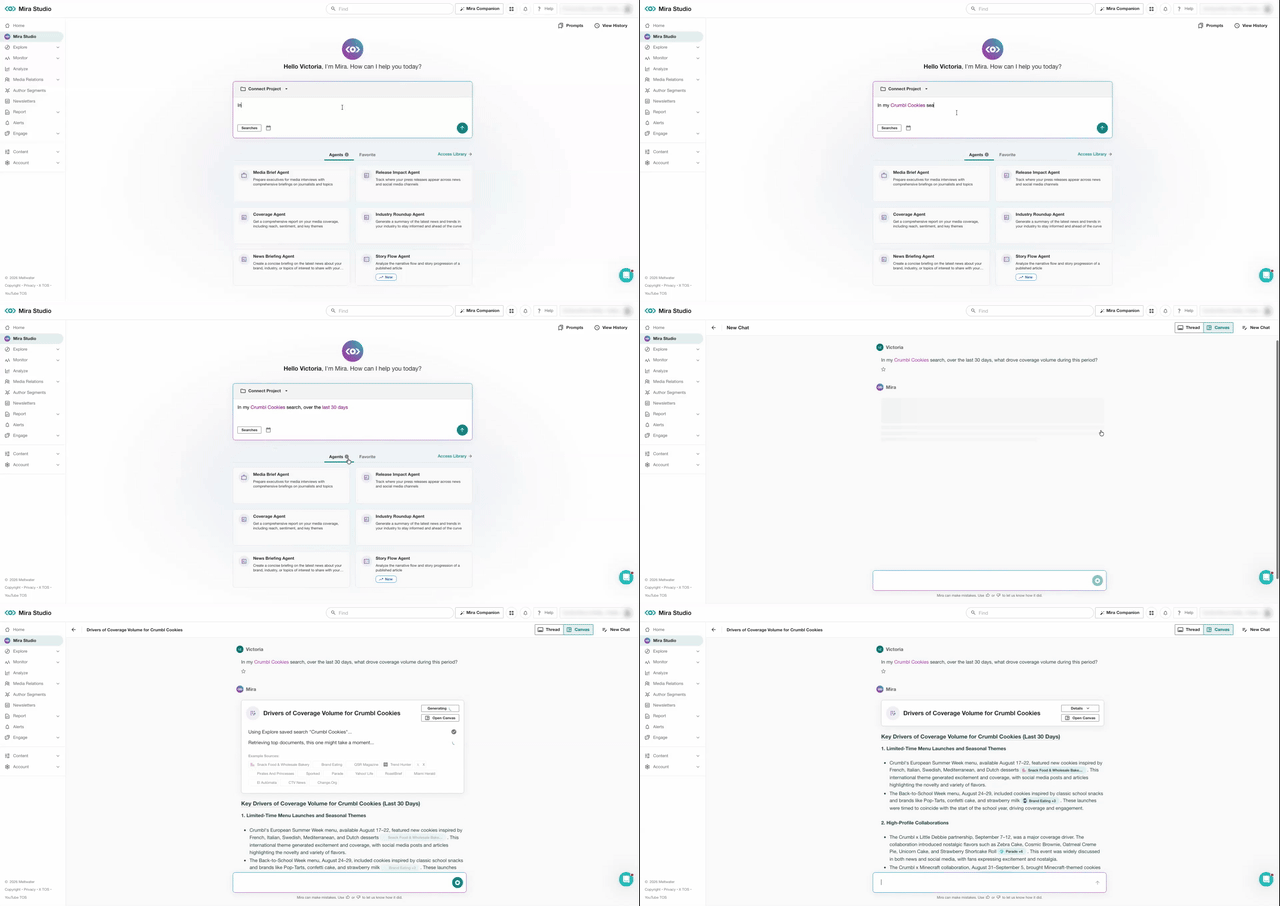
🔗 Step by Step: Using Mira Studio
(Optional) Add Competitive, Industry, and Risk Context
Use this step to put your brand’s performance in perspective. You may not need all three lenses. Add only what supports your audit goals.
Competitive Context
Use this when you need to understand how your visibility compares to peers.
Review your Competitive Benchmarking dashboard to assess:
- Share of voice across mentions volume and media channels
- Sentiment compared to competitors
- Engagement trends
- Regional impact (if relevant)
This puts your performance into competitive perspective.
If you don’t have competitor searches or a dashboard set up, refer to:
Industry/Market Context
Use this when you need to understand the broader conversation your brand sits within.
Review your Industry/Market Research search to assess:
- Which themes or narratives are shaping the industry
- Where attention and momentum are building or declining
- How your coverage aligns or diverges from industry trends
This places your coverage within the broader industry narrative.
If you don’t have an industry research search set up, refer to:
Risk and Crisis Context
If issues or crises occurred during the audit period, review your Risk Management dashboard to assess:
- How quickly issues surfaced
- How coverage and sentiment evolved
- Which sources or narratives amplified the situation
This highlights preparedness gaps and response opportunities.
If you don’t yet have a risk monitoring search or dashboard, refer to:
Assess & Share Findings
Turn insight into action.
Step 5: Create Clear Recommendations
Summarize your findings:
- What approaches consistently drove credible coverage?
- Where did performance lag or fail to land as expected?
- How did narratives, sentiment, or visibility shift over time?
- What strategic shifts should guide PR efforts in the next cycle?
Focus on direction here, not description.
Step 6: Share Findings from the Audit
Create a dashboard in Analyze (or use your existing Brand dashboard!) to compile key visualizations that help tell your story.
- Refer to the Custom Dashboards section in the Reporting & Sharing Insights Playbook for creating an Analyze Dashboard using the Brand template.
- Or create your own custom dashboard from scratch using insights from our widget catalog.
When ready, share your findings with stakeholders:
📺 Watch: How to Share a Dashboard from Analyze
🔗 Step by Step: How to Share a Dashboard from Analyze
Final Tip
Treat PR audits as an ongoing discipline. Reuse the structure, refine it each cycle, and use audits as checkpoints – not one-off exercises.