



Brand Monitoring Playbook
This playbook helps you get brand monitoring up and running quickly using the AI Search Assistant. It focuses on speed to insight, not a deep dive into the Explore.
Looking for broader media monitoring use cases or advanced workflows? Check out the Media Monitoring with Explore learning paths linked at the end.
Step 1: Before You Build: Set the Right Mindset
Define Your End Goal
Brand monitoring works best when you know what you want the data to do.
A strong brand search is flexible. It should support multiple questions after it’s built, but it needs one clear purpose up front. That purpose will guide how you build, refine, and analyze your results.
Ask yourself: What do I need this data for right now?
- Understand brand perception
Sentiment, trending themes, and how your brand is discussed across media and social
- Monitor coverage on specific channels
Where conversations are happening: news, broadcast, or key social platforms
- Identify influencers and advocates
Who is talking about your brand and driving engagement
- Track questions, issues, or risks
Concerns, complaints, or emerging issues tied to your brand
- Establish a baseline
A clean reference point to measure change over time
This keeps your brand search intentional and focused.
Once your search is built and validated, prompt the AI Search Assistant to explore different questions within that same search, without rebuilding it.
Step 2: Build and Improve Your Search with AI
Use the AI Search Assistant to create your initial brand search.
📺 Watch: How to Build Targeted Queries with the AI Search Assistant
🔗 Step by Step: Using the AI Search Assistant
Optional Support
To help the AI build an effective brand search, the Brand Checklist can help you think through additional keywords and exclusions.
Step 3: Review, Refine, and Save Your Search
Search building is iterative. This step is your quality check.
Preview your results and ask yourself:
- Are these mentions actually about my brand?
- Am I missing obvious coverage?
- Is there too much noise?
Then use AI, filters, or manually refine:
- 📺 Watch: Use the AI Search Assistant to Adjust Queries
- 📺 Watch: Filter to focus on particular sources, locations, languages, etc.
- 📺 (Optional) Watch: Use Boolean to manually adjust keywords
Once the results look good enough, save your search. Perfection comes later.
📺 Watch: How to Save a Search in Explore
🔗 Step by Step: How to Save a Search
Step 4: Analyze and Validate Insights
Once your search is saved, start analyzing what’s coming in.
📺 Watch: How to Understand Analytics and Insights
🔗 Step by Step: Using Brand Analytics with Tab-Level AI Insights
This is also a quality check step. If the results look off, return to Step 3 and refine.
Step 5: Track & Monitor
Once your search is validated, decide how you want to stay informed.
- Smart Alerts for immediate notifications regarding shifts in your data
- Digest Reports for scheduled media scans
- Monitor Streams for ongoing, real-time visibility
Check out the playbook:
Optional Step: Use Mira Studio to Explore Your Data
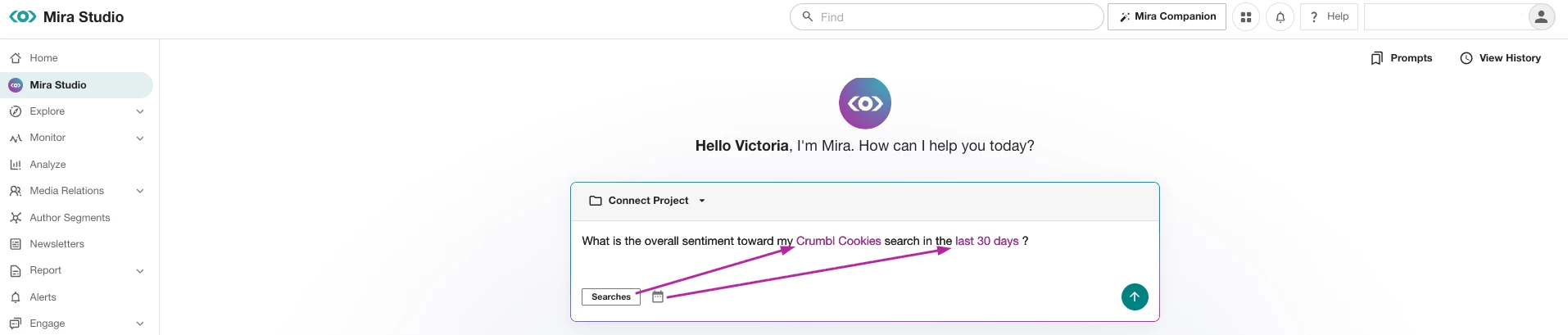
Once your brand search is built and validated, open Mira Studio and enter in one of these prompts to quickly explore what’s happening.
Brand Perception
- What is the overall sentiment toward [search] in the last [date range]?
- What are the key themes and topics associated with [search] in the last [date range]?
Visibility and Coverage
- Which sources or platforms are most active for conversations about [search] in the last [date range]?
Influencers and Impact
- Who is driving engagement around [search] in the last [date range]?
Questions, Issues, & Risks
- What are the most common questions or concerns about [search] in the last [date range]?
- What negative narratives are emerging about [search] in the last [date range]?
Step 6: Share Insights & Report
When you’re ready to share insights with stakeholders:
Final Note:
Start small. One brand, one goal, one search.
Brand monitoring works best when it’s built, reviewed, and improved over time
Ready to Level Up Your Media Monitoring Skills?
Expand on your Explore knowledge with these learning paths:
👉 Core Media Monitoring Learning Path
👉 Advanced Media Monitoring Learning Path