



Media Relations Playbook: From Strategy to Earned Impact

Plan and execute a Media Relations campaign that earns relevant coverage and demonstrates its impact.
Successful media relations doesn’t start with a journalist search or an email draft. It starts with knowing your goal, why your story deserves attention, and who needs to hear it.
Use this playbook to move from strategy to journalist research, outreach, coverage tracking, and reporting. By the end, you’ll have a repeatable process you can use for your next campaign.
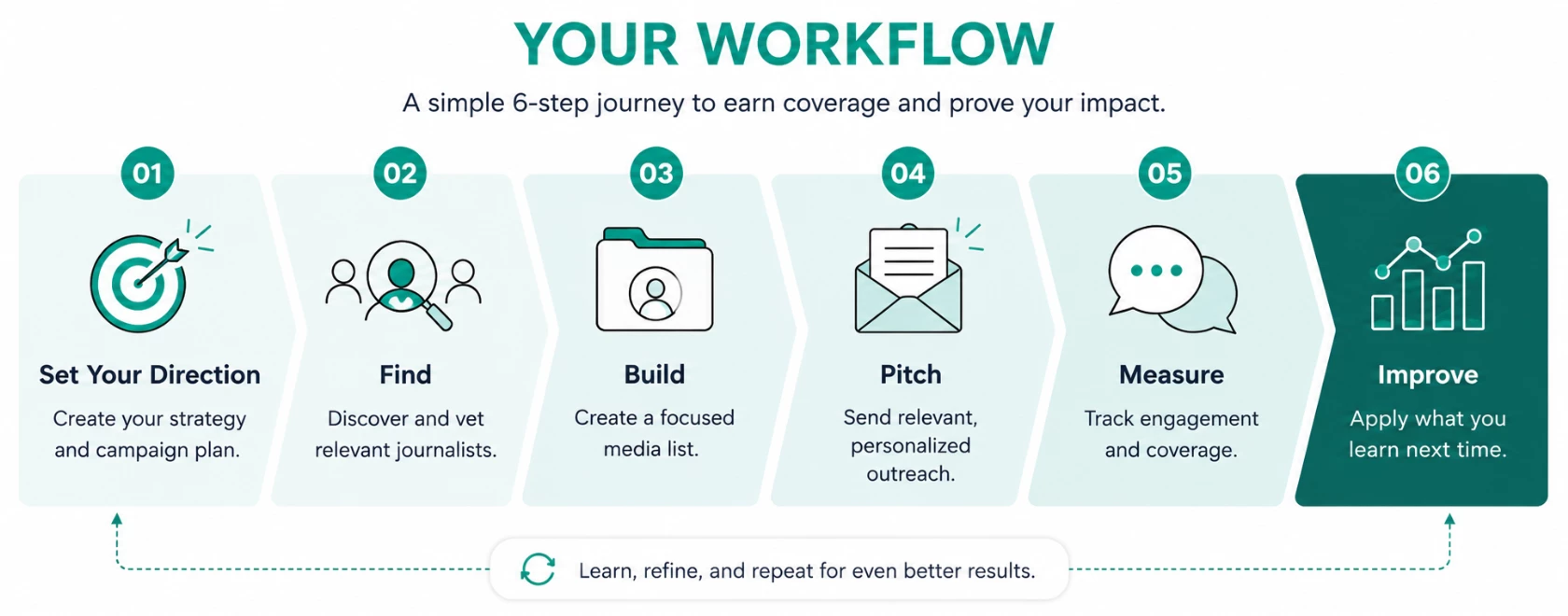
Before You Begin: Set Your Direction
Start with the outcome, not the database.
Knowing what you want to accomplish makes every decision that follows easier, from who you pitch to how you measure success.
Your media relations strategy sets your ongoing direction. Your campaign plan applies that strategy to the specific story you’re pitching. You need both to create an effective campaign.
🔗 Complete your Media Relations Strategy Worksheet
🔗 Complete your Media Relations Campaign Plan
Both worksheets are also available as attachments at the bottom of this playbook
Define Your Strategy
Your media relations strategy sets your ongoing direction. Your campaign plan applies that strategy to the specific story you’re pitching.
Your strategy should answer:
What role should earned media play in helping your organization achieve its goals?
You don’t need a 30-page strategy to get started. Use the Media Relations Strategy Worksheet to create a quick strategy snapshot.
💭 Need additional help building your strategy?
Turn Strategy Into a Campaign Plan
Get clear on these four things before you start searching for journalists or drafting your pitch:
- Goal – What are you trying to achieve?
- Audience – Who are you trying to influence?
- Story – What do you want them to know, and why now?
- Success – What would a good result look like?
Ready to build your plan?
🔗 Complete your Media Relations Campaign Plan
Prepare Meltwater for Outreach
Before you can message a journalist from the Meltwater platform, you will need to set up your email with Media Relations. Choose the sending method that fits how you plan to pitch:
| Approved Sender | Integrated Email |
| Broader outreach Think: media advisories, press releases | Relationship-driven outreach Think: 1-1 and small-list pitching |
| 💡 You can use both to serve different campaign plans | |
📺 Watch: How to Set Up an Approved Sender
🔗 Step by Step: Adding an Approved Sender in Media Relations
📺 Watch: How to Connect Your Email
🔗 Step by Step: Integrating Your Email in Meltwater
Step 1: Find the Right Journalists
Find contacts who have a reason to care about your story.
Start With Your Story
Use your campaign plan to guide your search:
- How to Find Journalists and Build Media Lists for PR Success
- Find the Right Journalists with a Media Contact Database
Then use Media Relations Search to discover relevant journalists and outlets.
📺 Watch: How to Search for Contacts in Media Relations
🔗 Step by Step: Searching for Contacts, Sources, Topics, or Podcasts in Media Relations
Check the Fit
Before adding a journalist, check them for story-fit:
⬜ Do they regularly cover this topic?
⬜ Is their audience relevant to our target audience?
⬜ Does their recent work suggest this story is a fit?
If you can’t easily explain why you’re pitching them, keep looking.
📺 Watch: How to Vet Journalists for Fit (click on the Vet Contacts marker on the play bar)
🔗 Step by Step: Vetting Journalists and Sources in Media Relations
Step 2: Build Your Targeted Media List
Turn your strongest-fit contacts into a campaign-ready list.
Create Your Media List
Add the journalists you’ve vetted to a media list organized around the story you’re pitching.
📺 Watch: How to Create a Media List (click on the Add Contacts to a Media List marker on the play bar)
🔗 Step by Step: Creating a Media List in Media Relations
Bring Existing Contacts into Meltwater
Already have trusted contacts in a spreadsheet or another system? Import them into Meltwater so established relationships can live alongside newly discovered contacts.
When imported contacts are matched to Meltwater’s media database, you can also keep those relationships current with Contact Update Alerts, which notify you when journalists change roles, outlets, or contact details. This means less manual list maintenance and fewer outdated contacts when it’s time to pitch.
📺 Watch: How to Import Contacts to a Media List
🔗 Step by Step: Importing Media Lists by Uploading CSV File
🤔 Quick Check: Would the same core pitch feel relevant to everyone on this list? If not, split the list into smaller, more focused groups.
How: Within the Media List, select the checkbox next to the journalists you want to group, then choose the Add to Another List icon.

💡 Pro Tip: Segment by beat, geography or market, story angle, audience, or another factor. If the pitch needs to change, the list probably should, too.
Step 3: Pitch with Purpose
Make it easy for the journalist to understand why they’re receiving your pitch.
Think like a Partner
Put yourself in the shoes of the journalist receiving the pitch:
Why am I receiving this? Why this story? Why now?
Learn from industry expert Nicolette Addesa on how to approach journalists as partners, tailor your pitch to what matters to them, and build stronger media relationships.
📺 Watch: The Human Approach to Media Pitching video
🎥 Watch the full webinar playback here
Build and Send Your Outreach
Use your research to personalize the pitch, keep the story clear and concise, and make the next step easy for the journalist.
📺 Watch: How to Build and Send an Outreach
🔗 Step by Step: Sending Outreach via Media Relations
💡 Pro Tip: Use the PR Assistant to help you explore angles or draft a starting point, then add your judgement, context, and personalization.
(Optional) Manage Replies in Meltwater
If you sent your outreach via Integrated Email, manage threaded journalist replies alongside your outreach activity.
📺 Watch: How to Manage Threaded Replies with Integrated Email (click on the Manage Threaded Replies with Integrated Email marker on the play bar)
🔗 Step by Step: Replying in an Existing Thread
Step 4: Measure the Impact
Move beyond “Did they open it?” Use your results to answer:
Did They Engage?
Use outreach metrics to understand how journalists responded to the pitch.
📺 Watch: How to Measure Outreach Performance
🔗 Step by Step: Measuring Outreach Performance
Did the Story Earn Coverage?
Review likely pickups and confirm coverage connected to your outreach.
📺 Watch: How to Review Outreach Pickups
🔗 Step by Step: Pitch Tracking in Media Relations Outreach
Look at the bigger story:
A confirmed pickup connects an article to a specific outreach. To understand how the story traveled across the media landscape, use:
Explore or Monitor
Track your announcement, spokespeople, key messages, campaign terms, and related coverage.
Analyze
Examine broader patterns such as coverage volume, sources, reach, geography, or sentiment.
Did it Support the Goal?
Now, go back to the campaign plan you created at the beginning to compare the results with the outcome you defined before the campaign:
- Did priority outlets cover your story?
- Were your key messages accurately portrayed?
- Did you reach the intended audience?
- Did the story gain attention beyond the contacts we pitched?
- What evidence shows progress towards your original goal?
Engagement is a signal. Coverage is an outcome. Impact is the goal.
Step 5: Learn and Improve
Use the results from this campaign to make the next one better.
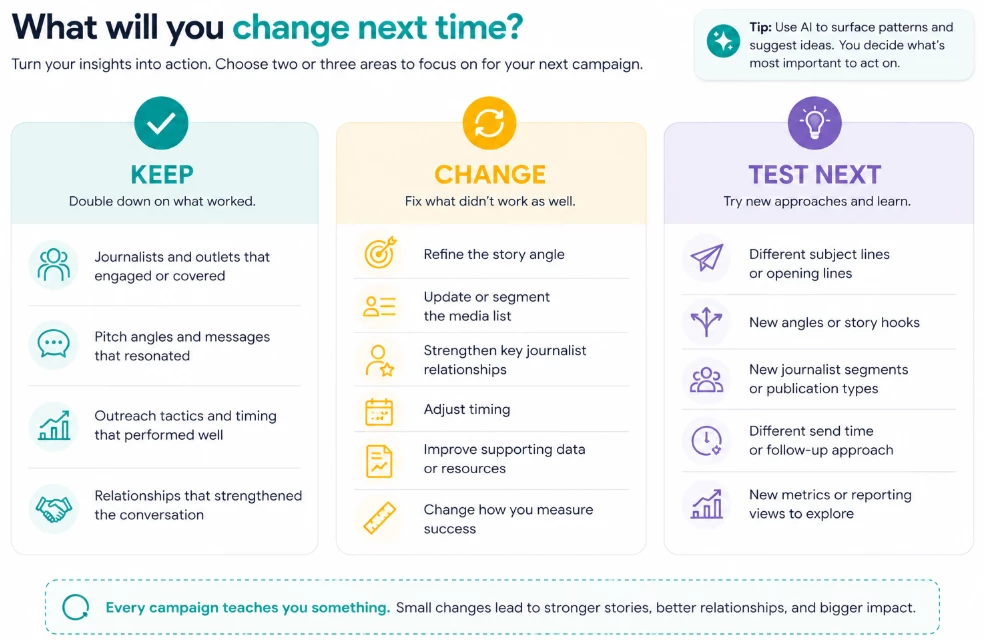
What worked?
- Which journalists and outlets engaged and/or covered the story?
- Which pitch angles or messages appeared to resonate?
What didn’t?
- Look for friction. Where did relevance, targeting, messaging, or timing fall short?
What will you change next time?
- Choose two or three actions for the next campaign.
Final Tip
Start with the outcome. Choose journalists based on story relevance and fit. Treat outreach as the beginning of a relationship, not the end of a distribution process. Then use the results to improve the next campaign.
Looking for More Training or to Get Certified?