



GenAI Lens: AI Visibility Monitoring Setup Playbook
You can’t optimize what you can’t see. And in AI, visibility is everything.
Your prompts and monitoring setup directly shape what you learn. Done well, this becomes a reliable system for tracking how AI represents your brand. Done poorly, you get noise.
This playbook walks you through building a setup in GenAI Lens that produces clear, actionable visibility into how your brand, competitors, and industry show up in AI responses.
What You’re Building
You’re setting up a monitoring system that helps you understand:
- Where your brand appears in LLM responses
- How your brand, products, and executives are described
- How your brand compares to your competitors
Think of this as AI perception tracking, not keyword monitoring.
📺 Watch: The AI Narrative Shift: Why This Matters Now
Step 1: Plan Your Monitoring Strategy
Before writing prompts, get clear on what you want to learn.
Start with questions someone might ask an AI:
- Is [your brand] good/ethical/sustainable?
- Best alternatives to [your brand]
- Top [industry category] tools
- Is [your competitor] better than [your brand]?
If it sounds like something someone would type into ChatGPT or Perplexity, you’re on the right track.
💡 Think Like Your Audience
Ask yourself:
- What would a buyer ask before choosing our brand?
- Who do we get compared to most often?
- What would someone ask when choosing between us and a competitor?
- Where should we be showing up, but might not be?
If your prompts don’t map to real decision moments, they won’t give meaningful insight.
Need Help Getting Started?
If you’re stuck, you can use your preferred AI assistant to generate ideas:
I need prompts to help [your brand] understand how it appears in AI-generated answers.
Generate 5 branded and 5 unbranded prompts, including negative/inverse versions.
Write them using natural language, the way real people would ask AI tools.
Use this as a starting point – then refine the prompts before adding them to GenAI Lens.
Ready? Now take those questions and build your prompts in Step 2. ⬇️
Step 2: Create Your Prompts
In GenAI Lens, you’ll start by creating one prompt – then expand from there.
After clicking on Create a Prompt, you’ll see the 3-step workflow:
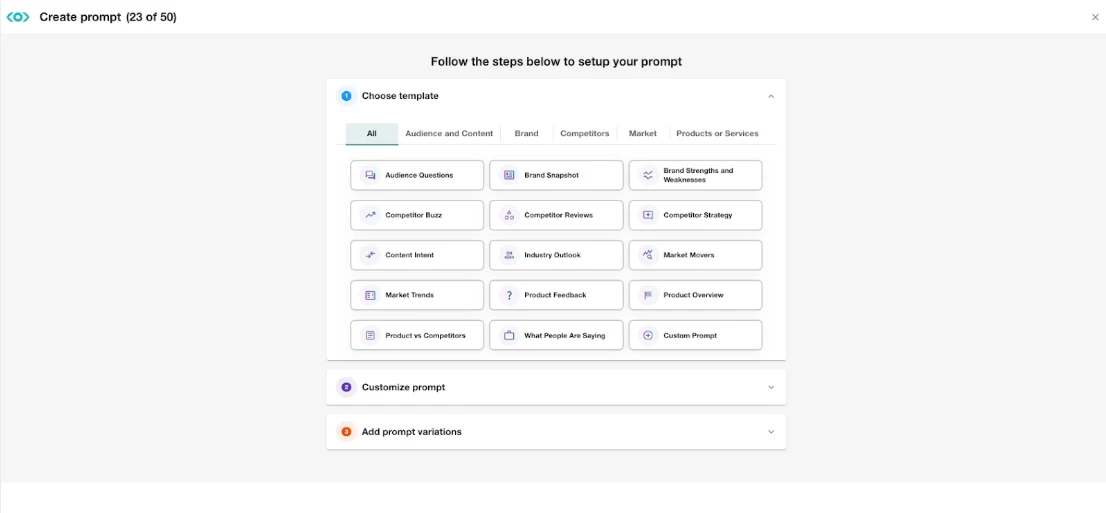
You can either choose from the available templates or create your own custom prompt based on your questions defined in Step 1. Templates can help you get started faster, but they should still be reviewed and refined to match your goals.
✍️ Start with one strong prompt
Choose from a template or one of your questions from Step 1 and turn it into one of these:
- A branded prompt (mentions your brand)
- What do people think of Spotify?
- How does Spotify compare to Apple Music?
- An unbranded prompt (mentions your category/industry but not you specifically)
- What are the best music streaming platforms?
Branded prompts help you understand direct perception.
Unbranded prompts help you understand market positioning.
⚙️ Customize Your Prompt
Before moving on:
- Preview the prompt
- Review and refine the wording
- Set a Target Country (if relevant)
⚠️ It’s important to get this part right, as prompt wording and Target Country cannot be edited later.
🏷️ Organize as You Go
During prompt creation, assign:
- Topic Folders → broad grouping (e.g., brand, campaign, region)
- Labels → flexible segmentation (product, risk, executive)
Setting structure early saves you from clutter chaos later. You can always edit topic folders and labels later in the Settings tab, so start organizing now and refine as you go.
🔁 Expand with Variations
Add variations to help you see the full picture:
- 1-2 additional branded and unbranded prompts
- At least one negative/inverse version of a prompt (this can be branded or unbranded)
- What are the worst music streaming platforms?
- Duplicate a prompt and add a Target Country (if relevant)
- Translate or localize your prompt to match your target country
Adding prompt variations helps you identify consistent themes in how AI responds.
📺 Watch: How to Create a Prompt in GenAI Lens
🔗 Step by Step: How to Create a Prompt in GenAI Lens
⚡ Need to scale fast?
Use Bulk Prompt Upload in Settings.
🔗 Step by Step: How to Bulk Upload Prompts in GenAI Lens
Step 3: Set Up Your Brand
Tailor your analysis to how your brand compares against key competitors.
📺 Watch: How to Set Up Brand Enrichment in GenAI Lens
🔗 Step by Step: Setting Up Your Brand
Step 4: Stay Organized as You Scale
As your LLM monitoring scales, structure becomes critical to staying organized.
Keep It Structured and Efficient
- Use Topic Folders for hierarchy
- Use Labels for flexible analysis
- Duplicate prompts to test variations or target countries
- Use bulk actions to clean up quickly
- Standardize naming (small detail, big impact)
A messy setup leads to misleading or inconsistent insights.
📺 Watch: How to Manage Your Prompts in GenAI Lens
📺 Watch: How to Manage Brands in GenAI Lens
🔗 Step by Step: Managing Your Monitoring Setup
Your GenAI Lens Setup Checklist
You’re ready for analysis when you have:
✔ Branded prompts
✔ Unbranded prompts
✔ At least one negative/inverse prompt (branded or unbranded)
✔ A prompt with a Target Country (if relevant)
✔ Topic Folders in place
✔ Labels applied
✔ Brand + competitors configured
If any of these are missing, your view is incomplete.
Final Tip: Treat GenAI Lens as a Living System
Your GenAI Lens monitoring setup isn’t a one-time task. It should evolve as often as your business and market do.
When to Update Your Setup
Revisit your prompts, topic folders, labels, and brand configuration when:
- New products or campaigns launch
- Campaign messaging changes
- New competitors emerge or gain traction
- Industry narratives shift
What to Audit Regularly
- Prompts → Are they still relevant?
- Topic Folders → Are they still structured logically?
- Labels → Are they named consistently and useful for analysis?
- Brand Configuration → Are the aliases, owned links, people, and products still accurate? Are all key competitors included?
If your setup is outdated or cluttered, your insights will be too.
Ready to Level Up Your LLM Monitoring Skills?
Expand on your GenAI Lens knowledge with this course:
👉 Monitoring AI Visibility with GenAI Lens